Notes · time tracking
Billable vs non-billable time: count the static too
What a client pays for, what they don't, why the second kind belongs in your rate, and how to track both without it becoming a chore.
Updated 2026-10-27
When you start freelancing, it is easy to think of your week as the hours a client pays for. Then the week fills up with email, invoices, a sales call that went nowhere, a portfolio update and a tax form, and you notice that a 40-hour week only produced 25 hours you could bill.
That is normal. The fix isn't to feel guilty about the other 15 hours. It is to know which is which, track both, and make sure your rate pays for all of it. Here is how to sort your time, why the non-billable part belongs inside your rate, and a simple way to track it.
Billable time: what a client pays for
Billable time is work you do for a specific client that your agreement says you can charge for. The agreement is what decides it, so read yours. For most freelancers billing by the hour, it usually includes:
- The work itself: designing, writing, coding, editing, bookkeeping, research for the project.
- Meetings and calls about the project, including the time to prepare for them if your agreement covers it.
- Revisions and changes the client asked for.
- Project admin that only exists because of this client, such as uploading files to their system or writing handoff notes.
If you are not sure whether something is billable, ask yourself: would this task exist if this client didn't? If no, and your agreement doesn't exclude it, it is usually billable. When a gray area keeps coming up, settle it with the client once, in writing, and then apply it the same way every time.
Non-billable time: the work behind the work
Non-billable time is everything that keeps your business running but can't be charged to one client:
- Finding work: proposals, pitches, discovery calls that don't turn into jobs, your portfolio and website.
- Running the business: invoicing, chasing payments, bookkeeping, taxes, contracts.
- Getting better: courses, practice, learning a new tool.
- Mistakes you choose to absorb: redoing something because you misread the brief, or fixing your own bug.
Some of these tasks are client-related but you decide not to charge for them, for example a short courtesy call. That is still non-billable time, and it is worth tracking for the same reason: so you can see what it costs you.
The picture at the top is an old TV showing static. Non-billable time is the static between channels: no one is watching, but the set is still on and still using power. Don't change the channel away from it. Count it.
Why non-billable time belongs in your rate
A salaried job pays you for 40 hours whether you spend them in meetings or doing focused work. As a freelancer, only the billable hours pay. So your hourly rate has to cover every hour of the week, spread over the hours a client actually pays for.
The math is simple. Say you want to earn $2,000 a week before tax, and you work 40 hours:
- If all 40 hours were billable, you would need $50 an hour.
- If 25 of those hours are billable and 15 are admin, sales and learning, you need $2,000 ÷ 25 = $80 an hour.
Same week, same income, very different rate. Freelancers who price at $50 in this example aren't earning $2,000. They are earning $1,250 and working the extra 15 hours for free.
Your rate also has to cover costs a salary hides. In the US, self-employed people usually pay self-employment tax of 15.3% (12.4% for Social Security and 2.9% for Medicare) if they have net earnings of $400 or more, on top of income tax (IRS Topic 554, Self-employment tax). This is general information, not tax advice.
Checked October 26, 2026.
The hourly rate calculator does this math for you: put in what you want to earn and how many hours you can realistically bill, and it gives you a rate. The rate guides show what people in your field charge, as a sanity check.
How to track both without it becoming a chore
You don't need a complicated system. You need every hour to land somewhere, and a flag that says whether it is billable.
- Make a "business" client or project for non-billable work. Proposals, invoicing, learning. In tab, a project can be set to "Not billed", so time on it is tracked but never priced or invoiced.
- Track client work as billable by default. When you decide not to charge for part of it, mark those entries as not billable instead of deleting them. In tab you can select entries on Today and mark them not billable in one step (with a 10-second undo).
- Fill the gaps. Most lost hours aren't decisions, they are forgotten. tab shows untracked stretches between entries so you can fill them in.
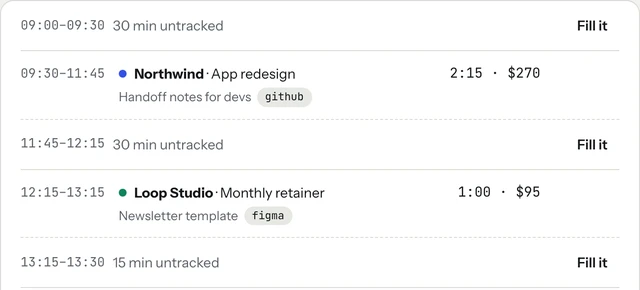
Non-billable entries never reach an invoice. If you share a live tab link with a client, it shows only the billable work and the total so far, so your admin hours stay yours.
Start the clock, no accountSign up free
What the numbers tell you
Once both kinds of time are tracked, look at the ratio every month or so. Two numbers matter most:
- Your billable share. Billable hours ÷ all hours worked. If it is falling, find out why: more sales time, slow payers, or work you are giving away.
- Your real rate per client. What you billed a client ÷ every hour you spent on them, billable or not. This is where courtesy calls and absorbed revisions show up.
tab's Money page shows the second one for each client: billed, hours tracked, your set rate and the real rate, in red when it is more than 10% below your rate.
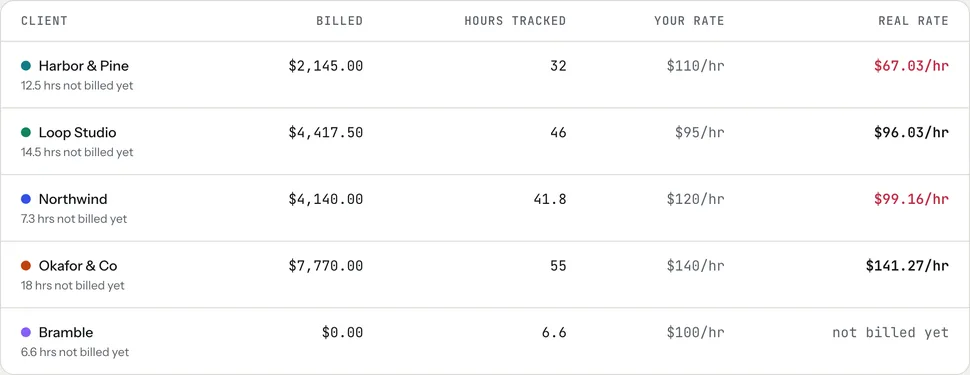
A low real rate isn't always a problem to fix with a higher price. Sometimes it is hours you simply haven't invoiced yet (the table lists those too), sometimes it is a client who needs a scope conversation, and sometimes it is a fixed price that was too low. Fixed-price projects get the same treatment: fee ÷ every hour tracked. The real rate page explains how it works, and you can start tracking right now with the meter on the homepage, no account needed.
Keep reading
 Finding unbilled hoursThe gaps, quick calls and forgotten timers, and a ten-minute Friday check to catch them.
 Track time by projectOne client, several jobs: split every hour onto the right project, and bill each one right.
 Freelance working hoursSet your hours, share them once, protect focus time, and see where the week really goes.
Questions
What is the difference between billable and non-billable hours?
Billable hours are work for a client that your agreement lets you charge for. Non-billable hours keep your business running but can't be charged to a client: proposals, invoicing, bookkeeping, learning and mistakes you choose to absorb.
Should freelancers track non-billable time?
Yes. Without it you can't see how many hours your income really covers, so you can't price correctly. Track it on a separate project or mark entries as not billable instead of skipping them.
How do I include non-billable time in my hourly rate?
Divide what you want to earn by the hours you can actually bill, not by all the hours you work. For example, $2,000 a week over 25 billable hours is $80 an hour, not $50.
Is answering client emails billable?
It depends on your agreement. Many freelancers bill project-related email and calls; others include short messages in their rate. Decide once, put it in writing, and apply it the same way every time.
See where every hour goes.
tab tracks billable and non-billable time per client, shows what each client really pays per hour, and turns the billable part into an invoice. Free to start, no account to try it.
Start free Try it, no sign-upFree to startNo cardNo screenshots, ever