Notes · time tracking
Headphones on: protecting focus blocks as a freelancer
When to schedule deep work, how to keep clients happy while you're heads down, and how to tell if the blocks are paying off.
Updated 2026-10-27
Most freelance work that clients pay well for needs long, quiet stretches: a design that has to hang together, code that has to be reasoned through, a report that has to make one clear argument. Those stretches are also the first thing to go. A message here, a "quick call?" there, and the day ends busy but with the hard part still not started.
A focus block is a stretch of time you set aside for one piece of demanding work and protect from everything else. Think of it as putting the headphones on: nothing changes about the work, only about what is allowed to reach you while you do it. Here is how to plan focus blocks, how to protect them from clients without seeming unreachable, and how to tell if they are working.
Pick the hours your brain does its best work
Start with when, not how long. Most people have a part of the day when hard thinking comes easier, often the first few hours after they start. Look back at the last two weeks and ask where the work you were proud of actually happened. That is where your focus blocks go.
Then size them. A block needs to be long enough to get properly into a problem and still have time to make progress, so 90 minutes to 3 hours is a practical range. Two blocks a day is a lot for most people. One protected block on each working day, every week, already changes what you can deliver.
Write the blocks into your calendar like client meetings, with a name that says what they are for ("Northwind checkout flow"), not just "busy". A named block is harder to give away, and it tells future you what to open when the block starts.
Decide before the block starts
A focus block often fails in its first ten minutes, while you decide what to do with it. Settle that the day before:
- One task, written down. "Finish the mobile states for checkout", not "work on Northwind".
- Everything open that the task needs, and nothing else. Close the email tab. Close the chat app, not just the window.
- A parking list. Keep a notepad beside you. When a thought arrives ("I must invoice Loop Studio"), write it down and keep going. You will deal with the list after the block.
- A clear end. Stop at the planned time and write two lines on where you got to. Starting the next block is much easier with that note waiting.
Silence the notifications on purpose
Your devices already have the tools; the trick is to set them up once so you don't have to remember. On an iPhone or Mac, a Focus lets you silence notifications and allow only the people and apps you choose (Apple Support). If you work in Google Workspace, Google Calendar's Focus time can mute chat notifications and automatically decline meetings during the block, on Business Standard and Plus, Enterprise, Education and Nonprofit accounts (Google Calendar Help). Either way, the point is the same: the default during a block is silence, and only a short list of real exceptions can get through.
Checked October 26, 2026.
Tell clients how to reach you, not when you're busy
Clients don't need to know your focus schedule. They need to know how fast you reply and how to reach you when something is truly urgent. Agree both once, in writing, and the blocks take care of themselves:
The second message matters more than it looks. It says yes to the client and yes to the block, and it moves the call to a time you chose. Most clients care that you answer; very few care whether it was at 10:07 or 11:30. Setting working hours in general, and what to say when clients cross them, is covered in freelance working hours.
Track the block like any other work
Start the clock for the client when the block starts and stop it when it ends. This does two useful things. It keeps you honest about where the time went, and it gives you a record of what a focused hour produces for each client, which is exactly what you need to estimate the next project.
In tab, the meter shows what is on the client's tab while you work, and one tap switches it to another client if the block runs into something else. On a computer it can also pop out into a small floating window, so it stays in view while you are in Figma or your editor, rather than in a browser tab you have to go and find.
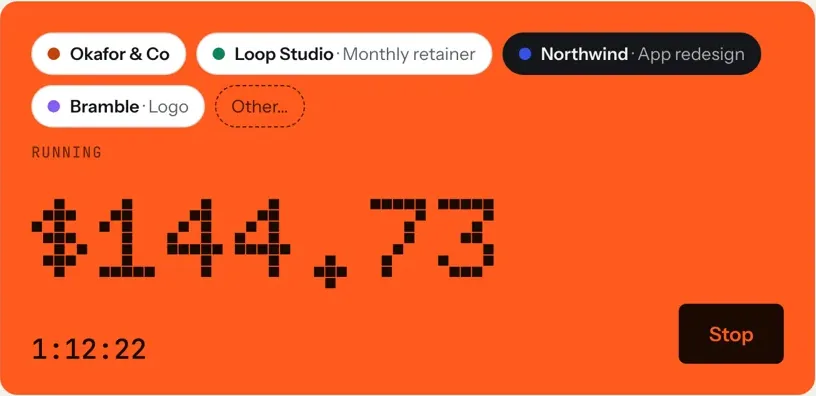
If you close tab with the clock still running, it can email you about 20 minutes later with a button to stop the timer at the time you left, so a block that ended in a hurry doesn't turn into an evening on the client's bill.
Check whether the blocks are working
After two weeks, look at three things:
- Did the blocks happen? Count how many you planned and how many you kept. If calls keep landing in them, offer fewer call slots, on fewer days.
- What came out of them? Read the notes on your tracked time. The entries from inside a block should be the substantial ones.
- How does the day add up? A day with one good block and a few small tasks can still be a full billable day.
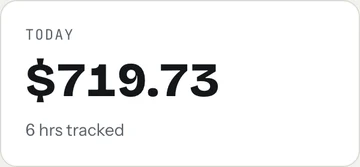
If the numbers show focused hours keep turning into unbilled ones, the problem may be price, not focus: a fixed fee that assumed fewer hours, or a client whose small requests eat the afternoon. Check what each job really paid per hour, and see billable vs non-billable time for how to count the rest.
A simple weekly setup
- Choose your best hours and put one named focus block in each working day.
- Set up a Focus or Do Not Disturb that allows only real exceptions.
- Tell each client your reply time and your urgent-only route, once.
- Write tomorrow's one task before you stop today.
- Track the block on the client's clock. The meter on the homepage runs without an account.
Keep reading
 Finding unbilled hoursThe gaps, quick calls and forgotten timers, and a ten-minute Friday check to catch them.
 Track time by projectOne client, several jobs: split every hour onto the right project, and bill each one right.
 Freelance working hoursSet your hours, share them once, protect focus time, and see where the week really goes.
Questions
How long should a focus block be?
Long enough to get into the problem and still make progress: 90 minutes to 3 hours suits most people. One protected block on each working day is a good start; two is a lot.
How do I tell clients I'm not available during focus time?
You don't have to mention the blocks at all. Tell clients how fast you reply (for example within one working day) and how to reach you for a real emergency. Then answer messages between blocks.
Should I take client calls during a focus block?
Usually not. Reply after the block and offer two times that suit you. Keep calls to a few fixed slots on one or two days so they don't break up every day.
Can tab stay visible while I work in another app?
On a computer, yes. The meter can pop out into a small floating window that stays in view while you work elsewhere. On phones the meter stays in the app.
Keep the clock running, quietly.
Track each focus block on the right client, switch with one tap, and see what the day added up to. Free to start, no account to try it.
Start free Try it, no sign-upFree to startNo cardNo screenshots, ever