Notes · time tracking
The one that's missing: finding your unbilled hours
Where lost hours hide, how to catch them the same day, and a ten-minute Friday check for the ones that slipped through.
Updated 2026-10-27
Look at a pool from above and every tile lines up, until you notice the one that's missing. A week of freelance work is like that. The big blocks are all there: the morning on the redesign, the afternoon on the newsletter. What's missing is the small stuff in between, and when you bill by the hour, every missing piece is money you earned and never asked for.
This note is about finding those hours: where they hide, how to catch them the same day, and a weekly check that picks up whatever slipped through.
Where unbilled hours hide
Lost time follows a pattern. Most of it falls into a few places:
- The gaps in a day. You stop the timer for lunch and start working again at 1:15 without starting it. The afternoon is real work with no record.
- Quick calls. A client phones "for two minutes" and it's twenty-five. Nobody starts a timer for a two-minute call.
- Email and messages. Replies to feedback, answers to questions, sending files. Each one is small. Together they can be an hour a day.
- Work away from your desk. Thinking through a problem on a walk, reading a brief on your phone, a quick fix from the couch at night.
- Forgotten timers. The opposite problem: the clock kept running after you stopped. That isn't lost money, but it's time you can't bill honestly, and it hides the real total.
- Hours tracked but never invoiced. The time is recorded, but it never made it onto an invoice, often a few hours left over after the last bill.
Only the last one is a billing problem. All the others are tracking problems, and they're easiest to fix on the day they happen, while you still remember.
Catch it the same day
Look at the gaps before you finish
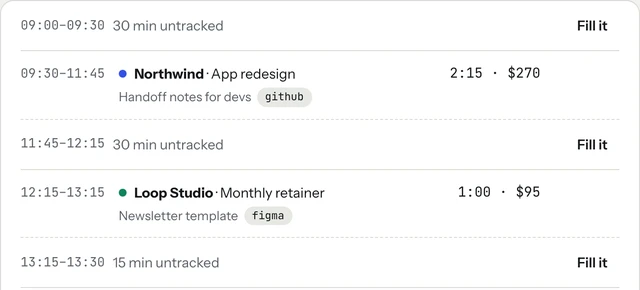
Before you close your laptop, look at your day as a timeline. Every stretch inside your working hours with nothing tracked is a question: was that a break, or was that work? Most of the time you'll know immediately.
tab does this for you. The Today screen shows the untracked stretches inside your working hours, each with a Fill it button, so you can drop the right client into the gap in a tap.
Log the small things right away
For a call or a burst of emails, don't try to start a timer. Write it down afterwards in a few words. In tab, quick add takes plain language, for example 25m northwind / call about checkout or 2h figma northwind yesterday, and shows exactly what it will save before you save it. The weekly timesheet also takes typed hours straight into a cell.
Let the clock speak up
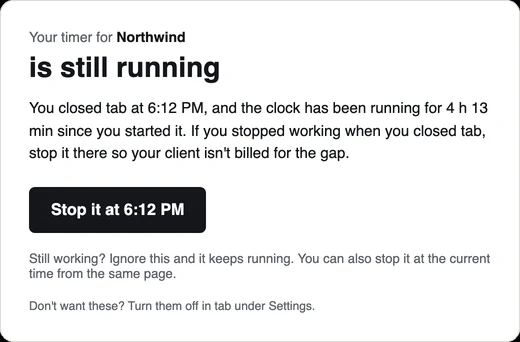
Most lost time comes from forgetting, so reminders help more than willpower. tab has a few gentle ones, each with its own switch: a nudge when it looks like you forgot to start (only inside your working hours), a check-in when a timer has been running much longer than usual ("Still on Northwind?"), and, if you leave the timer running and close tab, an email with a button to stop it at the time you closed it.
Start the clock, no accountSign up free
The weekly check: ten minutes on Friday
Some time will still slip through. A short weekly review picks it up while the week is fresh:
- Look at each day's total. A day that shows three hours when you remember working seven is the place to start.
- Check your sent mail and call log. Every client email and call should match some tracked time. If a client got six emails from you on Tuesday and Tuesday has nothing for them, something is missing.
- Check your calendar. Meetings are the easiest hours to forget, because the timer was never involved.
- Check the work itself. File histories, commits, document edits: if you changed a client's file on Wednesday, Wednesday should have time for that client.
- Fix it now. Add what's missing with an honest estimate and a short note saying what it was.
Be honest in both directions. The point is billing what you actually worked, not padding. Clients who see clear notes on every entry rarely question the hours.
Find hours tracked but never invoiced
The last hiding place is the one people least expect: time that is tracked, correct, and sitting in your records, but never billed. It builds up when you invoice a fixed set of dates and the last few days fall outside them, or when a small client never quite gets an invoice.
The fix is to look at unbilled hours per client, not per invoice. In tab, each client's tab is exactly that: every finished, billable hour not yet on an invoice. Closing the tab turns all of it into an invoice in one step, and anything that can't be billed is listed with the reason, never dropped quietly. The Money page also lists hours not billed yet next to each client's real rate, so a low rate that just means "not invoiced yet" is obvious.
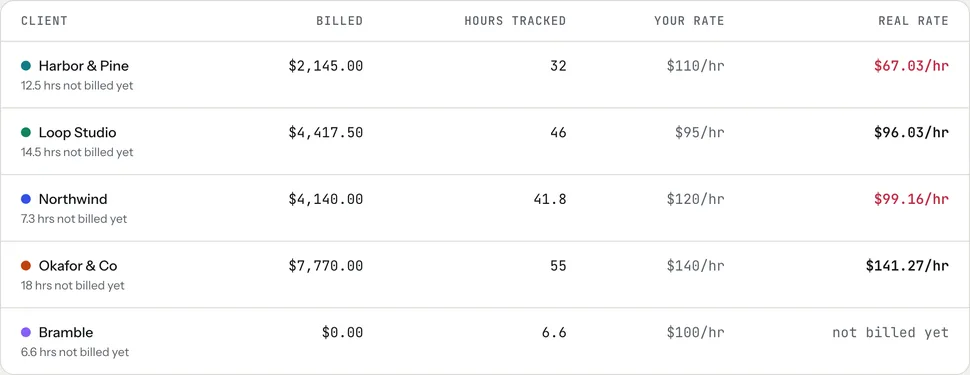
Harbor & Pine's real rate in that sample looks low, but 12.5 of its hours simply haven't been billed. That isn't a pricing problem. It's an invoice waiting to be sent. Not using tab? The timesheet to invoice tool turns a week of hours into line items, and the free invoice generator makes the invoice.
Keep the notes
A short note on each entry ("call about checkout", "fixed mobile menu") is what turns a number into a record. The IRS says good records help you "monitor the progress of your business" and support what you report on your tax return (IRS: Recordkeeping). For a freelancer, a dated list of what you worked on, for whom and for how long, matched to the invoices it became, is exactly that.
Checked October 26, 2026. General information, not tax advice.
Start with today
You don't need to go back through last month. Track today, look at the gaps before you stop, and do the Friday check once. If several clients share your week, give each its own button (four clients, one clock) and split bigger clients into projects (tracking time by project). Or start the meter on the homepage right now, no account needed.
Keep reading
 Track time by projectOne client, several jobs: split every hour onto the right project, and bill each one right.
 Freelance working hoursSet your hours, share them once, protect focus time, and see where the week really goes.
 The 15-minute Friday closeHours, client updates, invoices, late payments, tax and Monday: six steps every Friday.
Questions
How do freelancers find unbilled hours?
Look at each day's untracked gaps before you finish, log short calls and emails right after they happen, and once a week compare your tracked time against your sent mail, call log, calendar and file history.
How do I remember to track short calls and emails?
Don't try to time them. Log them right afterwards in a few words with an honest estimate, for example 25 minutes for a call, with a note about what it was.
Is it OK to add time after the fact?
Yes, as long as it's honest. Add it with a realistic estimate and a note saying what the work was. Clear notes make the hours easy for a client to accept.
What about a timer I forgot to stop?
Trim the entry back to when you actually stopped. In tab, if you close the app with a timer running, it emails you a button to stop it at the time you closed it.
Bill every hour you worked.
tab shows the gaps in your day, reminds you when you forgot to start, and turns every unbilled hour into an invoice. Free to start, no account to try it.
Start free Try it, no sign-upFree to startNo cardNo screenshots, ever