Notes · getting paid
Ghosted on an invoice? How to follow up without the awkward
A three-step follow-up schedule, the words to use at each step, and what to do when a client still won't pay.
Updated 2026-10-27
You did the work. You sent the invoice. The due date came and went, and your client went quiet. When you are new to freelancing this is the part nobody warns you about, and it feels awful: you don't want to sound desperate, you don't want to lose the client, and you are not sure if you are even allowed to ask.
You are. Asking to be paid for finished work is normal business, and a clear, polite follow-up is the first step every time. Here is a simple schedule you can use for every client, the words to use at each step, and what to do if a client still won't pay.
Before it's late: make the invoice easy to pay
Most "ghosting" starts with an invoice that is easy to put off. Three things make it hard to ignore:
- A due date on every invoice. "Due on receipt" is vague. Pick a real date, for example 14 days out, and put it on the invoice.
- A way to pay in one click. A pay link (bank transfer or card) turns "I'll do it later" into thirty seconds. Bank details in a PDF work too, but they add steps.
- No surprises. If the client has already seen and approved the hours, the invoice is just the bill for something they said yes to. In tab, a weekly work receipt shows the client what you worked on, with links to the real work, and they confirm it with one tap.
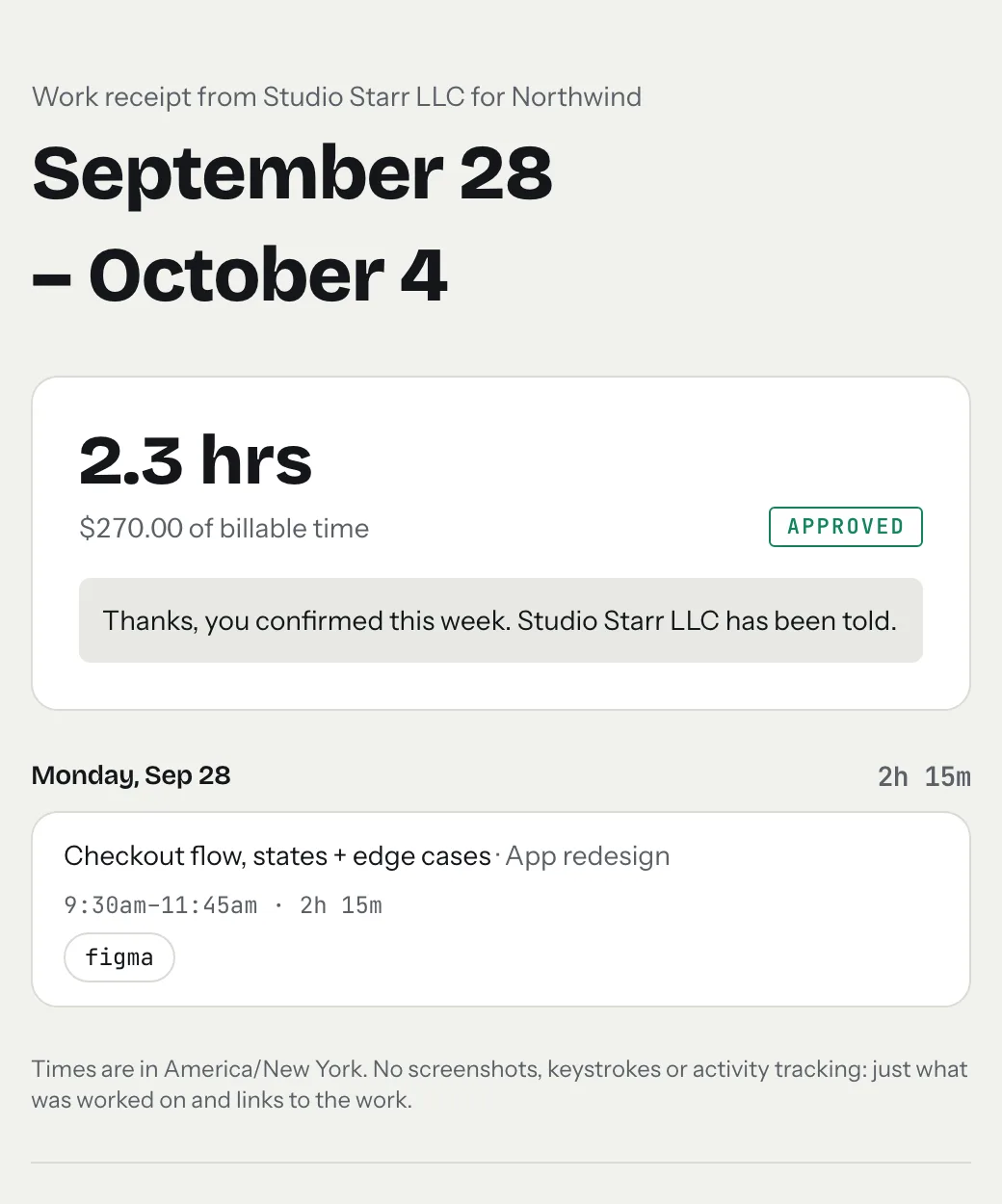
Need an invoice right now? The free invoice generator makes one with a due date in a minute, and timesheet to invoice turns your hours into line items.
The follow-up schedule: day 3, day 10, day 21
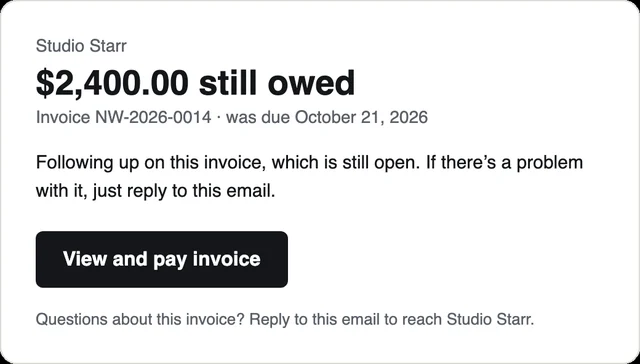
Count from the due date, not from when you sent the invoice. Three messages, each a little more direct than the last, and never two in the same week. This is the schedule tab uses for its automatic reminders, and the wording below is the actual text tab sends.
Notice what these don't do: no guilt, no "just checking in!", no long explanation. Each one says the invoice is open, gives the client an easy way out ("ignore this if it's on its way"), and asks them to reply if something is wrong. A reply is good news. Often the invoice went to the wrong person, or there is a question about one line, and you can fix that in a day.
Let tab send them for you
In tab, you switch on overdue reminders for a client, and tab emails them at 3, 10 and 21 days past the due date: from you (replies come straight to your inbox), with the pay link, three at most. Reminders are off until you turn them on, so the clients who always pay on time never get chased.
Start the clock, no accountSign up free
Still nothing after 21 days?
Switch channels. An email can sit unread for weeks; a short phone call or a message on whatever app you normally use with this client gets an answer. Keep it plain: "Hi, invoice [number] for [amount] was due on [date]. Can you tell me when it'll be paid?" Then:
- Pause new work for that client until the open invoice is paid. Say so kindly and in writing.
- Keep everything in one place: the invoice, the approved hours, every reminder and reply. If it ever goes further, that record is your case.
- Know your rights. Some places now have laws written for exactly this. In New York City, New York State and Illinois, if a contract doesn't say when you get paid, the client generally has 30 days after you finish the work, and there is an official way to file a complaint. Details below.
- Small claims court is built for amounts like a freelance invoice, and in most places you can file without a lawyer. Limits and fees differ by state, so check your local court's website.
Laws that protect freelancers from late payment
These are summaries of the official pages, read on October 26, 2026. They are not legal advice; if a lot of money is involved, talk to a lawyer where you live.
- New York City, Freelance Isn't Free Act. Contracts of $800 or more (including several jobs that add up to $800 within 120 days) must be in writing. If the contract has no payment date, the client must pay within 30 days after you complete the work, and a freelancer who isn't paid on time can collect double the unpaid amount. Source: NYC Department of Consumer and Worker Protection.
- New York State, Freelance Isn't Free Act (since August 28, 2024). Extends written-contract and timely-payment protections statewide for work worth $800 or more over 120 days. Source: New York State Department of Labor.
- Illinois, Freelance Worker Protection Act (contracts after July 1, 2024). Covers work worth $500 or more in a 120-day period; payment is due by the date in the contract, or within 30 days of finishing the work if no date is set. Source: Illinois Department of Labor.
Checked October 26, 2026. Other states and cities are considering similar laws; your client's location can matter as much as yours.
A due date only works if you know what you're owed
Chasing is easier when the number is right and the client already agreed to it. Track time per client as you work (the tab meter runs right on the homepage, no account), check what a fixed fee really paid per hour, and price the next job with the hourly rate calculator or your profession's rate guide. When the money does land, the freelance tax calculator shows how much of it to set aside.



Questions
How long should I wait before following up on an unpaid invoice?
Send a friendly reminder about 3 days after the due date, a more direct follow-up around day 10, and a final reminder around day 21. Count from the due date, not from when you sent the invoice, and don't send two in the same week.
What should I say when a client hasn't paid?
Keep it short and neutral: the invoice number, the amount, that it is past due, and an easy next step (a pay link, or 'reply if there's a problem'). Leave out guilt and long explanations.
Can a client legally pay me whenever they want?
Not everywhere. In New York City, New York State and Illinois, freelance laws say that if your contract has no payment date, the client must pay within 30 days after you finish the work. Elsewhere it depends on your contract and local law.
Does tab chase clients automatically?
Only if you turn it on for that client. tab then emails them at 3, 10 and 21 days past the due date, from you, with a link to pay online, at most three times.
Stop chasing invoices by hand.
tab tracks your hours, turns them into an invoice your client pays online, and sends the polite reminders for you. Free to start, no account to try it.
Start free Try it, no sign-upFree to startNo cardNo screenshots, ever