Notes · getting paid
One ticket, one number: a simple invoice numbering system
Three rules, four formats to choose from, and what to do when you send the wrong invoice or skip a number.
Updated 2026-10-27
Your first invoice needs a number, and it's surprisingly easy to stall on it. Does it start at 1? Should it look bigger, so you seem established? Does it need the client's name in it? What happens if you make a mistake?
The good news: numbering is one of the few parts of freelancing with a simple, permanent answer. Pick a format once, follow three rules, and you never think about it again. Like a roll of raffle tickets, each number gets used exactly once, in order.
Why invoices need numbers at all
- Matching payments. When $1,620 lands in your account, the number in the payment reference tells you which invoice it paid. Without it, two invoices for similar amounts are easy to mix up.
- Talking about one invoice. "Invoice SS-2026-0014" is clearer than "the one from last month" in every reminder, question or dispute.
- Your client's accounts team. Clients who pay many suppliers file each bill under its number, so a clear one gets your invoice into their system without questions.
- Your records. In the US, the IRS lists invoices among the supporting documents that show your gross receipts, alongside bank deposit slips and receipt books (IRS Publication 583). A clean, unbroken run of numbers makes it obvious nothing is missing.
- Sometimes it's required. In the UK, for example, the government's guidance says an invoice must include "a unique identification number" (GOV.UK, what invoices must include). If you work in or bill clients in other countries, check their rules.
Checked October 26, 2026. General information, not tax or legal advice.
Three rules that cover almost everything
- Every number is unique. No two invoices ever share one, even for different clients.
- Numbers go up in order. Each new invoice gets the next number. The order shows when each one was issued.
- Never reuse or delete a number. If an invoice you've sent is wrong, don't edit it into a different invoice or remove it. Void it, note why, and send a new invoice with the next number. The voided one stays in your records.
That's it. Everything else is a matter of taste.
Four formats, from simplest up
Choose one and keep it. Any of these works:
- Plain sequence:
0001,0002,0003. The simplest possible system. Padding with zeros keeps the numbers the same length and in order when a computer sorts them. - Year and sequence:
2026-0001. The year makes old invoices easy to find at tax time. - Prefix, year and sequence:
SS-2026-0001, where SS is your initials or business name. It tells a client's accounts team at a glance whose invoice it is. - Client code:
NW-0001for Northwind, with a separate sequence per client. Handy if you have a few long-term clients, but you have to track several counters. If you choose this, also keep one master list so no number is ever used twice.
Worried that "0001" makes you look new? You can start at any number you like, for example 0101, as long as you go up from there and never skip back.
When things go wrong
- You sent an invoice with a mistake. Void it and send a corrected one with the next number. Tell the client in one line: "Invoice 0014 had the wrong hours; it's been voided and replaced by 0015."
- You skipped a number by accident. Don't panic, and don't go back and fill it in later. Write a short note in your records ("0007 not used") so the gap has an explanation.
- You used the same number twice. Keep the first one, and reissue the second with a new number and a note to the client.
- The client paid part of it. The number stays the same. Record the payment against that invoice and show the balance still owed.
How tab numbers invoices
tab does the counting for you, using the prefix, year and sequence format. In Settings you can set a number prefix of up to eight characters, like your initials. Each invoice gets its number at the moment you send it, so a draft you delete never uses up a number, and numbers are never skipped or reused. If you void a sent invoice, it keeps its number in your records and the next invoice gets the next one.
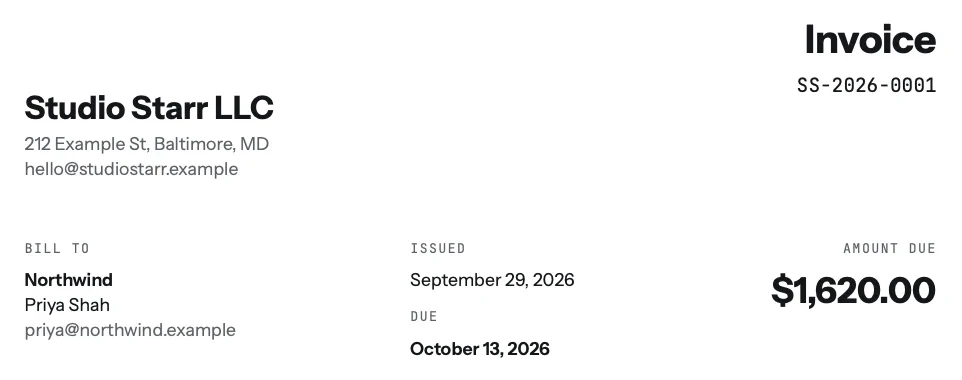
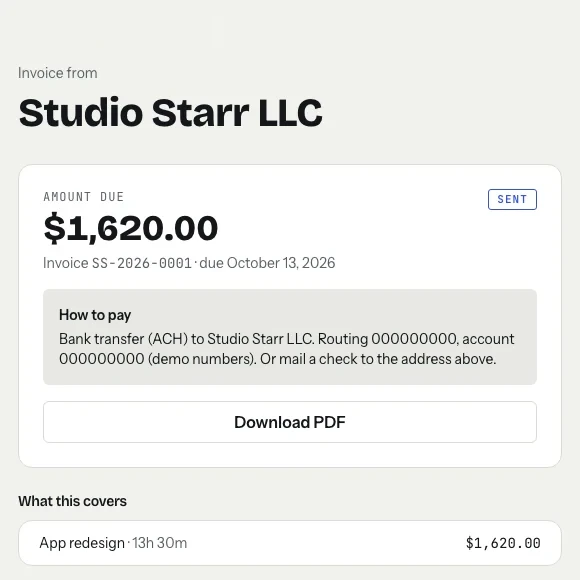
The same number follows the invoice everywhere: on the PDF, on the page where the client pays, in reminders and in the email you get when it's paid. That makes matching a payment to an invoice a glance, not a search.
Need a single invoice right now, without an account? The free invoice generator lets you type a number and builds the PDF, and timesheet to invoice turns hours into line items. When you send it, how to email an invoice has a subject line to use, with the number in it.
Start the clock, no accountSign up free
Keep a simple list
If you number invoices by hand, keep one list (a spreadsheet is fine) with each number, date, client, amount and status: sent, paid, void. Check it before you create a new invoice. That list, plus a separate bank account, makes the year's records almost write themselves. Freelance record keeping covers what else to keep, and for how long.
Keep reading

Questions
What number should my first invoice be?
Any number you like, as long as every invoice after it goes up in order and no number is ever reused. Many freelancers start at 0001 or include the year, like 2026-0001.
What is a good invoice numbering format?
A prefix, the year and a sequence, such as SS-2026-0001, is easy to read and sort. A plain sequence like 0001, 0002 also works. Pick one format and keep it.
Can I reuse or change an invoice number?
No. If a sent invoice is wrong, void it and issue a new invoice with the next number. Keep the voided one in your records so the sequence has no unexplained gaps.
Does tab number invoices automatically?
Yes. tab gives each invoice the next number when you send it, in a prefix-year-sequence format like SS-2026-0001, with an optional prefix of up to eight characters set in Settings.
Let the numbers count themselves.
tab numbers every invoice in order when you send it, puts the number on the PDF, pay page and reminders, and never skips one. Free to start, no account to try it.
Start free Try it, no sign-upFree to startNo cardNo screenshots, ever