Notes · money & taxes
Freelance record keeping: what to keep, and for how long
Invoices, payments, receipts and time logs: the short list of records to keep, the IRS rules on how long, and a system that takes minutes a month.
Updated 2026-10-27
When you work for yourself, nobody hands you a pay stub or a year-end summary. Your records are the only proof of what you earned, what you spent and what you did for each client. They are what you file your taxes from, what you show a client who questions an invoice, and what you would need if the IRS ever asked.
The good news: the list is short, and if you keep it as you go, it takes minutes a month. Here is what to keep, how long to keep it, and a simple way to organise it. This is general information for US freelancers, not tax or legal advice; an accountant can tell you what applies to you.
Why the IRS cares about your records
The IRS lists the reasons plainly: records help you monitor your business, prepare financial statements, identify where income came from, keep track of deductible expenses, and support the income, expenses and credits on your tax return (IRS: Why should I keep records?). It also says you must keep business records available for inspection.
You don't need special software or a particular format. In the IRS's words, you "may choose any recordkeeping system suited to your business that clearly shows your income and expenses" (IRS: Recordkeeping). A folder per year and an app that exports to spreadsheets is enough for most freelancers.
The records to keep
The IRS groups business records into income (gross receipts), purchases, expenses and assets, and gives examples of the documents that back each one up, such as invoices, deposit records, Forms 1099-MISC, canceled checks, account statements and receipts (IRS: What kind of records should I keep). For a freelancer, that usually means:
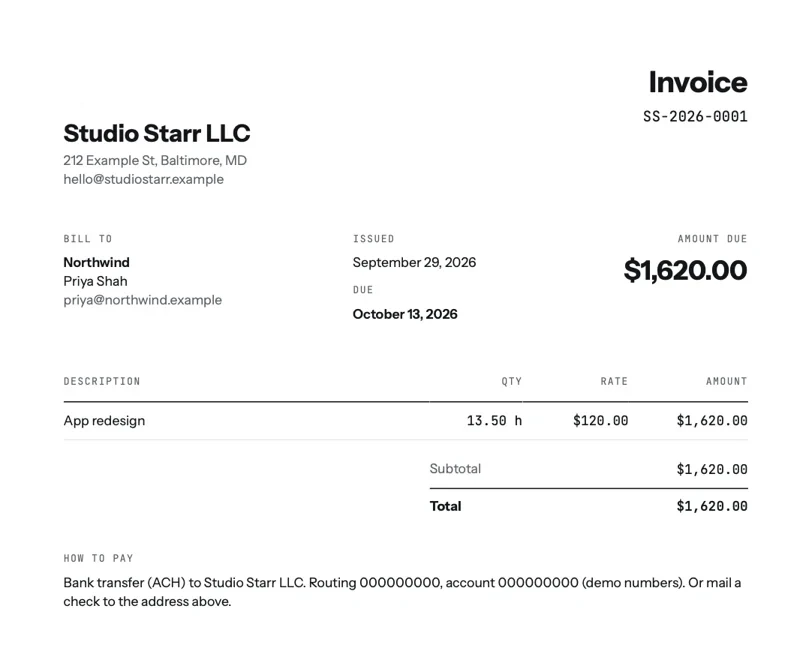
- Invoices you sent. Every one, including voided and corrected ones, with the number, date, client, what it covered and the amount.
- Payments you received. The date, the amount, which invoice it paid, and how (bank transfer, card, check). Bank statements and payment processor reports back these up.
- Tax forms from clients and platforms. Any 1099 forms you receive.
- Expense receipts. Software, equipment, a share of your phone bill, courses: whatever you plan to deduct, with who you paid, how much, when and what for.
- Records for equipment and other assets. When you bought it, what it cost, and when you sold or got rid of it.
- Contracts and agreements. Scope, rate and payment terms, plus any emails that changed them.
- Your time logs. For hourly work, these are the proof behind every invoice. Keep the client, date, hours and a note of what was done.
How long to keep them
How long depends on the period of limitations, the time in which you can amend a return or the IRS can assess more tax. The IRS's own rules (IRS: How long should I keep records?):
- 3 years from filing in the usual case.
- 3 years from filing or 2 years from paying the tax, whichever is later, if you file a claim for a credit or refund after you file.
- 6 years if you don't report income you should have, and it is more than 25% of the gross income shown on your return.
- 7 years if you claim a loss from worthless securities or a bad debt deduction.
- Indefinitely if you don't file a return, or file a fraudulent one.
- At least 4 years for employment tax records, if you have employees.
- Property and equipment: until the period of limitations runs out for the year you dispose of it.
Before you throw anything out, the same page says to check whether you need it for other reasons: your insurance company or creditors may require you to keep records longer than the IRS does. Keeping everything for 7 years covers every case above except the indefinite ones. Your state may have its own rules, so check with your state tax agency too.
Checked October 26, 2026.
A simple system that takes minutes a month
Lay it out like rings around a single year: one folder per tax year, and inside it the same few folders every time.
- Invoices. The PDFs you sent, named by number.
- Payments. A spreadsheet of payments received, plus your processor's monthly reports.
- Expenses. Receipts, photographed or forwarded the day you get them.
- Time. A spreadsheet export of your hours.
- Tax. 1099s, estimated payment confirmations and the return you filed.
Once a month, ideally when you close out the month, export what's new and drop it in. Back the folder up somewhere other than your laptop.

tab keeps the income side together: each sent invoice as a PDF, each payment against its invoice (including checks and transfers you record by hand), and every time entry with its note. The Money screen exports time entries, invoices, payments and clients as CSV files that open in Excel or Google Sheets, free on every plan. tab doesn't store expense receipts, so keep those in your expenses folder.
If you only need a single invoice, the invoice generator makes a PDF to file. To see what to set aside from each payment, use the freelance tax calculator, and the payment fee calculator shows how much of a payment processor's deposit was fees, which is worth recording too.
Good habits that save you later
- Record as you go. The IRS notes that unless you record expenses when they happen, you may forget them by tax time.
- Keep business and personal money apart. A separate account makes every statement a business record.
- Never delete a sent invoice. Void it and issue a new one, so the numbers stay in order.
- Write a note on your time. "3h" proves nothing a year later; "3h, homepage copy revisions" does.
Keep reading
 Planning for a slow seasonYour monthly floor, a buffer from the good months, and the past clients to write to first.
 A separate business accountWhy the IRS says to keep business money apart, and how to set it up in an afternoon.
 An emergency fund, freelance styleYour monthly floor, a target in months, and a share of every payment until it's full.
Questions
How long should a freelancer keep tax records?
In the usual case the IRS says 3 years from when you filed. It is 6 years if you left out income worth more than 25% of the gross income on your return, 7 years for a bad debt or worthless securities loss, and indefinitely if you didn't file. Keeping everything for 7 years covers every case except the indefinite ones.
What records does a freelancer need to keep?
Invoices sent, payments received, 1099 forms, receipts for expenses you deduct, records for equipment, contracts, and time logs for hourly work.
Are digital copies of receipts and invoices OK?
The IRS lets you use any recordkeeping system suited to your business that clearly shows income and expenses, and it publishes guidance on electronic records. Keep digital copies readable and backed up.
Can I export my records from tab?
Yes. tab exports time entries, invoices, payments and clients as CSV files, free on every plan, and keeps each sent invoice as a PDF.
Your income records, kept for you.
tab keeps every hour, invoice and payment together and exports it all as CSV whenever your accountant asks. Free to start, no account to try it.
Start free Try it, no sign-upFree to startNo cardNo screenshots, ever