Notes · getting paid
Month-end invoicing: close out the month before it closes on you
Review your hours, catch the ones you missed, invoice before the month ends, and check what is still unpaid. Plus a checklist to reuse.
Updated 2026-10-27
The last few days of a month are a good time to settle up. If you bill by the hour, every week you wait to invoice is a week your money sits with your client instead of with you. And the longer the gap between the work and the bill, the harder it is to remember what you did, and the easier it is for a client to question it.
A month-end close does not need to be a big bookkeeping ritual. For most freelancers it is about an hour: check your hours, catch the ones you missed, send the invoices, and look at what is still unpaid. Here is how to do it, plus a short checklist you can reuse every month.
Why invoice before the month closes
Many clients pay invoices on a set schedule rather than the day they arrive, so an invoice that turns up a week into the new month can end up waiting for the next round. An invoice dated inside the month it covers is also simpler for everyone's books: the work, the bill and the month all line up.
There is a practical reason on your side too. Sending invoices on a fixed day turns billing into a habit instead of a chore you put off. Pick the last working day of the month (or the last Friday) and treat it like a meeting with yourself.
Step 1: review every client's hours
Open a week-by-week view of your time and go client by client. You are looking for three things:
- Days that look empty. If you remember working on a Tuesday but the row shows nothing, the hours were probably never logged.
- Numbers that look wrong. A timer left running over lunch, or eight hours on a task that took two.
- Time on the wrong client. Easy to do when you switch between projects all day.
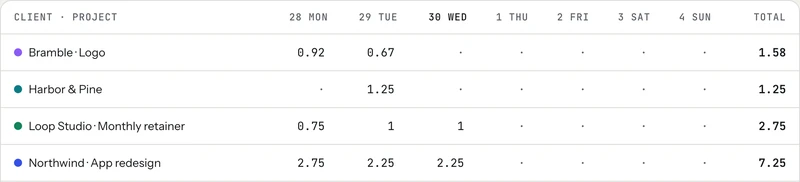
Check your calendar and sent email against the timesheet. Meetings, calls and the "quick look" emails are the hours that most often go unlogged.
Step 2: catch the gaps
Gaps are the stretches inside your working day where nothing was tracked. Some of them really were breaks. Others were client work you forgot to start a timer for. Go through them while the month is still fresh in your head and fill in the ones that were work, with a short note saying what you did.
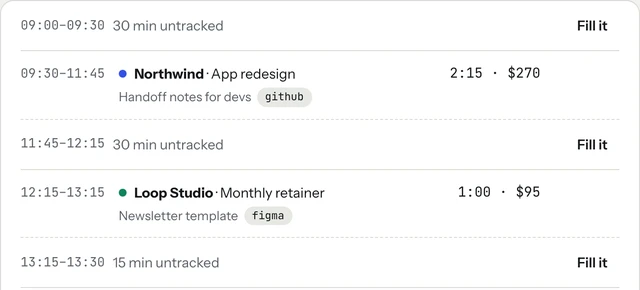
tab shows these gaps on Today and checks in gently during the working hours you set, so forgotten hours have a chance to get billed. If you track by hand, a quick scan of each day is enough.
Step 3: send the invoices
For hourly work, the invoice is just the approved hours times your rate, plus any expenses you agreed to pass on. Before you send, check:
- The dates it covers. "October 1 to October 31" on the invoice saves a question later.
- A real due date. Use the payment terms you agreed, for example 14 days, and write the actual date.
- Line items a client can recognise. The project name and the hours, not just one lump sum.
- How to pay. A pay link, or your bank details, on the invoice itself.
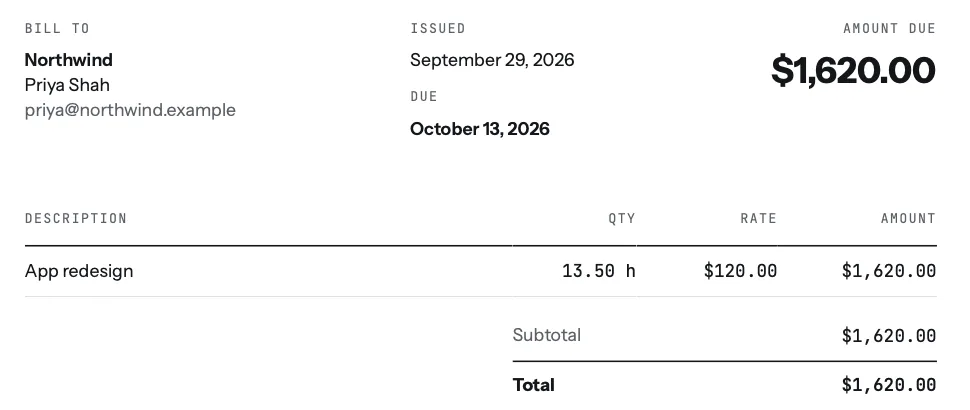
In tab, stopping the clock does most of this: unbilled hours for a client become a checked invoice in one step, with the due date taken from that client's payment terms. If you don't use an app, the free timesheet to invoice tool turns a list of hours into line items, and the invoice generator makes the PDF.
Fixed-fee work counts too. If a project is paid in parts, month end is a good moment to bill the next part that is finished. For retainers, send the next month's invoice now so it lands before the new month starts.
Step 4: look at what is still open
Once this month's invoices are out, look at last month's. Anything past its due date gets a short, polite reminder. The unpaid invoice follow-up guide has a simple day 3, day 10, day 21 schedule and the exact words to use.
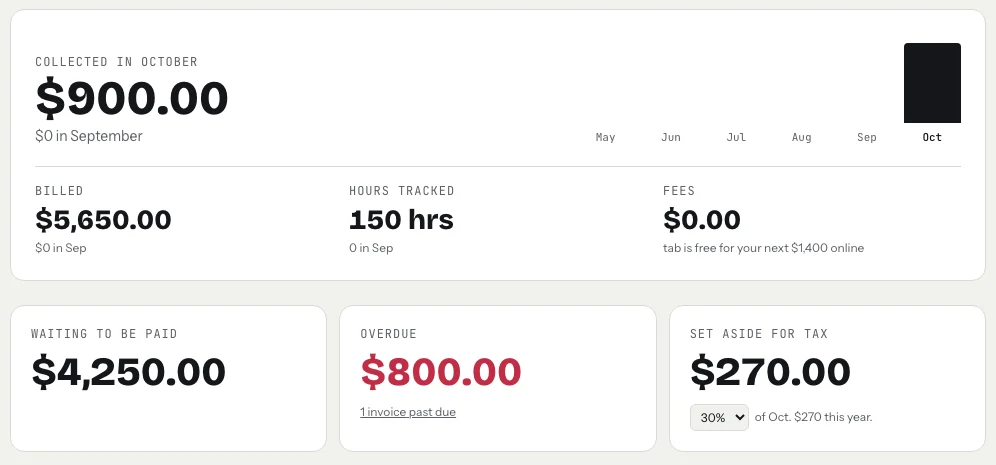
This is also the moment to check your real rate. If a fixed-fee project took far more hours than planned, you want to know now, not after the next quote. The real hourly rate page explains how to work it out.
Step 5: set aside tax and save your records
Move a share of what you were paid this month into a separate account for tax. The freelance tax calculator gives you a starting percentage. In the US, the IRS says you generally have to make estimated tax payments if you expect to owe $1,000 or more when you file, and the payment for September 1 to December 31 income is due January 15 of the following year (IRS: Estimated taxes; IRS: estimated tax due dates). This is general information, not tax advice.
Then save the month: invoices sent, payments received and your time log, in one folder. tab exports time entries, invoices, payments and clients as CSV files, free on every plan.
Checked October 26, 2026.
The month-end checklist
- Review each client's hours for the month, day by day.
- Fill in forgotten gaps with a short note of what you did.
- Fix timers that ran too long and time logged to the wrong client.
- Send an invoice to every client with unbilled hours, with a real due date.
- Bill finished fixed-fee parts and next month's retainers.
- Send a polite reminder on anything past due.
- Set aside a share of what you collected for tax.
- Export or file the month's invoices, payments and time log.
A blood moon is rare enough that people stop to look. Month end is the opposite: it comes around every few weeks, which is exactly why it works as a habit. Do the same eight steps each time and billing stops being something you dread.
Keep reading



Questions
Should I invoice at the end of the month or when the work is done?
Either works if you are consistent. For ongoing hourly work, a fixed monthly (or weekly) invoice day is easiest. For a one-off project, invoice when the work is delivered. What matters is that every invoice has a real due date.
What date should a month-end invoice have?
Date it on the day you send it, list the period it covers (for example October 1 to October 31), and set the due date from your payment terms, such as 14 or 30 days later.
How do I find hours I forgot to track?
Compare your timesheet with your calendar, sent email and the files you changed that day. In tab, untracked stretches inside your working hours show on Today with a button to fill them in.
What records should I keep from each month?
The invoices you sent, the payments you received, receipts for expenses and your time log. Keep them together by year; the IRS explains how long to keep tax records on its recordkeeping pages.
Make month end take ten minutes.
tab tracks your hours per client, flags the gaps, and turns unbilled time into an invoice your client pays online. Free to start, no account to try it.
Start free Try it, no sign-upFree to startNo cardNo screenshots, ever