Notes · clients
Out of office: tell clients your holiday schedule now
The 2026 dates to plan around, the message to send this month, and an out-of-office reply you can copy.
Updated 2026-10-27
Early November feels too soon to talk about December. It isn't. Your clients are planning their year-end right now: launches they want out before the break, budgets they need to spend, reports due in January. If they don't know when you're away, they will plan around a version of you who works straight through the holidays.
Telling clients your holiday schedule now, in one clear message, is one of the kindest things you can do for them and for yourself. Here are the dates that matter in 2026, a simple plan for the weeks around them, and an out-of-office message you can copy.
The dates to plan around
In the US, these are the three federal holidays that shape the end of the year. Federal Reserve Banks close on all three, so bank transfers don't process on those days.
- Thanksgiving Day: Thursday, November 26, 2026.
- Christmas Day: Friday, December 25, 2026.
- New Year's Day: Friday, January 1, 2027.
That last point matters for getting paid. The Federal Reserve's FedACH holiday schedule shows ACH processing pausing around each holiday and resuming afterward, so a bank transfer a client starts just before a holiday can land a business day later than you expect. If you want money in before the break, invoice early.
Your own days off are the other half. Write them down now: the days you're fully away, the days you're working but slower, and the date you're back.
Checked October 26, 2026. Sources: US Office of Personnel Management, federal holidays; Federal Reserve Financial Services, holiday schedules.
Tell clients now: one message, three dates
A good holiday notice gives clients three things they can plan around:
- The last day for new requests. Anything that arrives after it starts in the new year. Give yourself a week or so of buffer before you stop.
- Your days away. The exact dates, not "the last two weeks of December".
- Your first day back, and what you'll pick up first.
Send it in early to mid November, then mention it again in your last update before Thanksgiving and in the first week of December. Clients forget, and a reminder three weeks out is far better than a surprise three days out.
Swap in your own dates. The last line is the useful one: it turns a notice into a planning conversation, and it often brings in work clients wanted done before the year closes.
Wrap up money before you leave
The worst time to find unbilled hours is January, when the client's books for last year are already closing. In your last working week:
- Invoice everything. Every client, every unbilled hour, and any fixed-price part that's due. Put a real due date on each invoice.
- Make it easy to pay. A pay link gets more invoices paid before the break than bank details in a PDF.
- Check open invoices. Anything already overdue deserves a polite follow-up before you go, not after. This note on following up has a schedule and wording.
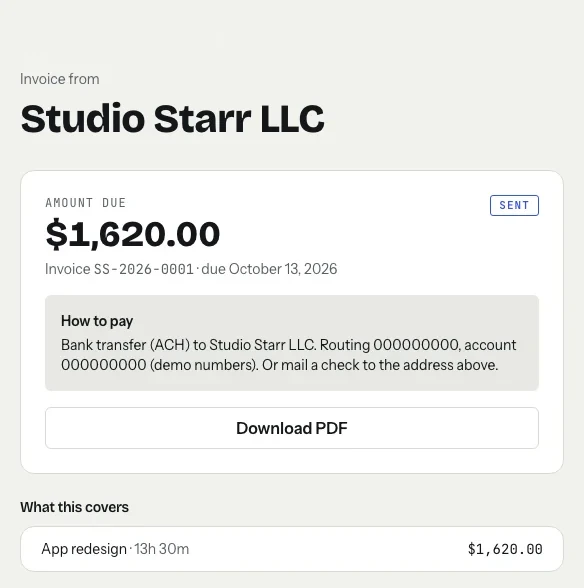
In tab, closing the tab for a client turns their unbilled hours into an invoice you check and send, with a page where the client can pay online.
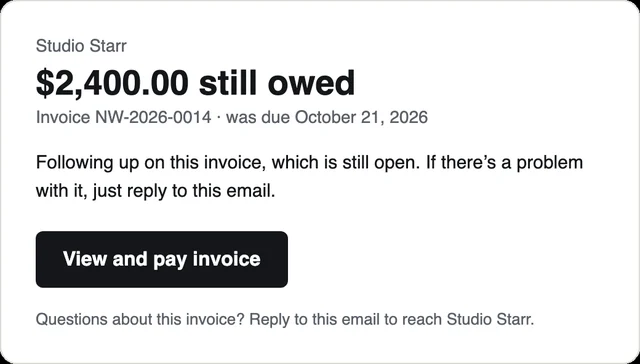
If you switched on overdue reminders for a client, they keep running while you're away: tab emails the client from you at 3, 10 and 21 days past the due date, with the pay link, and replies come to your inbox for when you're back.
Need an invoice without an app? The free invoice generator makes one in a minute, and timesheet to invoice turns a list of hours into line items.
Your out-of-office message
Set it the evening before your first day off. Keep it short: when you're back, what happens to their message, and what to do if something is truly urgent (only if you are willing to be reached).
Use the same dates in your email signature and on any shared calendar or project tool your clients see, so there's one story everywhere.
While you're away
Try not to work "just a little". One quick fix teaches the client that you're available, and it's very easy to forget to track. If you do work, start the clock, even for ten minutes.
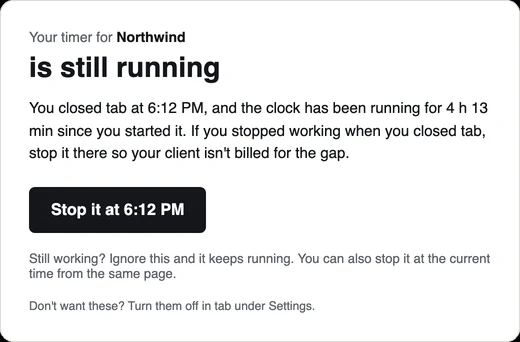
And when you stop for the year, stop the timer too. If you close tab with a clock still running, tab can email you about 20 minutes later with a button to stop it at the time you left, so no client is billed for your holiday.
Your working hours in tab's Settings also decide when its in-app check-ins appear, so you can take your away days off the schedule and it stays quiet.
Coming back in January
Block your first morning back for catch-up, not client work: read everything, reply in order, and confirm new dates for anything that moved. Then look at what December actually earned. If the break made money tight, the note on slow months covers building a buffer, and past clients are often the quickest way to fill January.
Want to see what's on each client's tab before you go? The homepage meter runs without an account.
Keep reading
 Freelance contract basicsThe six things to settle in writing before you start, and where the law requires it.
 Weekly client updatesWhat to send every Friday so the invoice is just the total of things the client already saw.
 Saying no to clientsFour kinds of no (later, smaller, at my rate, not me) and the words for each.
Questions
When should I tell clients about my holiday schedule?
In early to mid November, with a reminder before Thanksgiving and again in early December. Give them three dates: the last day for new requests, the days you're away, and your first day back.
What dates are the 2026 holidays?
Thanksgiving Day is Thursday, November 26, 2026, Christmas Day is Friday, December 25, 2026, and New Year's Day is Friday, January 1, 2027. Federal Reserve Banks are closed on all three, so bank transfers don't process those days.
What should a freelancer's out-of-office message say?
When you're back, that you'll reply to messages in order, and how to pay an invoice in the meantime. Only add an emergency contact if you're really willing to be reached.
Should I invoice before the holidays?
Yes. Invoice every unbilled hour in your last working week, with a real due date and a pay link, so clients can pay before their own books close for the year.
Invoice everything before the break.
tab turns every client's unbilled hours into an invoice they can pay online, and sends the polite reminders while you're away. Free to start, no account to try it.
Start free Try it, no sign-upFree to startNo cardNo screenshots, ever