Notes · clients
Show the work as you go, and the invoice is never a surprise
What a good weekly client update contains, the words to use, and how to send one in a minute.
Updated 2026-10-27
A shop window at dusk does one job well: the lights come on, and anyone walking past can see what is inside before they open the door. Client work can run the same way. When a client sees the work as it happens, the invoice at the end of the month is just the total of things they already looked at.
When it doesn't, the invoice is the first time they hear how many hours went in, and that is when the questions start. "Why did this take 14 hours?" is a hard conversation three weeks later and an easy one on Friday. A short weekly update, sent the same way every week, heads it off.
Why invoices surprise clients
Most invoice pushback is not about the rate. It comes from three gaps:
- They didn't see the work happen. The client remembers asking for "a few tweaks". They never saw the six rounds it turned into.
- The hours arrive all at once. A month of time in one number feels bigger than four weeks of small numbers they already saw.
- The invoice has no detail. "Design work, 22 hours" asks the client to trust you. A list of what was done, with links, shows them.
A weekly update closes all three. It also gives the client a regular, low-stakes moment to say "that's more than we planned" while there is still time to change course.
What a good weekly update contains
Keep it short enough to read in a minute. Five parts cover nearly every kind of client work:
Send it on the same day each week, so it becomes a habit for both of you. Friday afternoon works well for many freelancers because the week is fresh and the client can read it Monday morning.
Example wording for the top of the message: "Here's what I worked on this week, with links to the work. Next week I'm planning to finish the settings screens. Could you send the new logo files by Wednesday?" That is the whole cover note. The detail lives underneath.
The weekly work receipt in tab
If you track your time in tab, the update is already written. Each client's page has a Work receipts section with one row per week. Press Send, add an optional message, and the client gets a link to that week: total hours, the billable amount, and each entry with its note, times and links to the work.
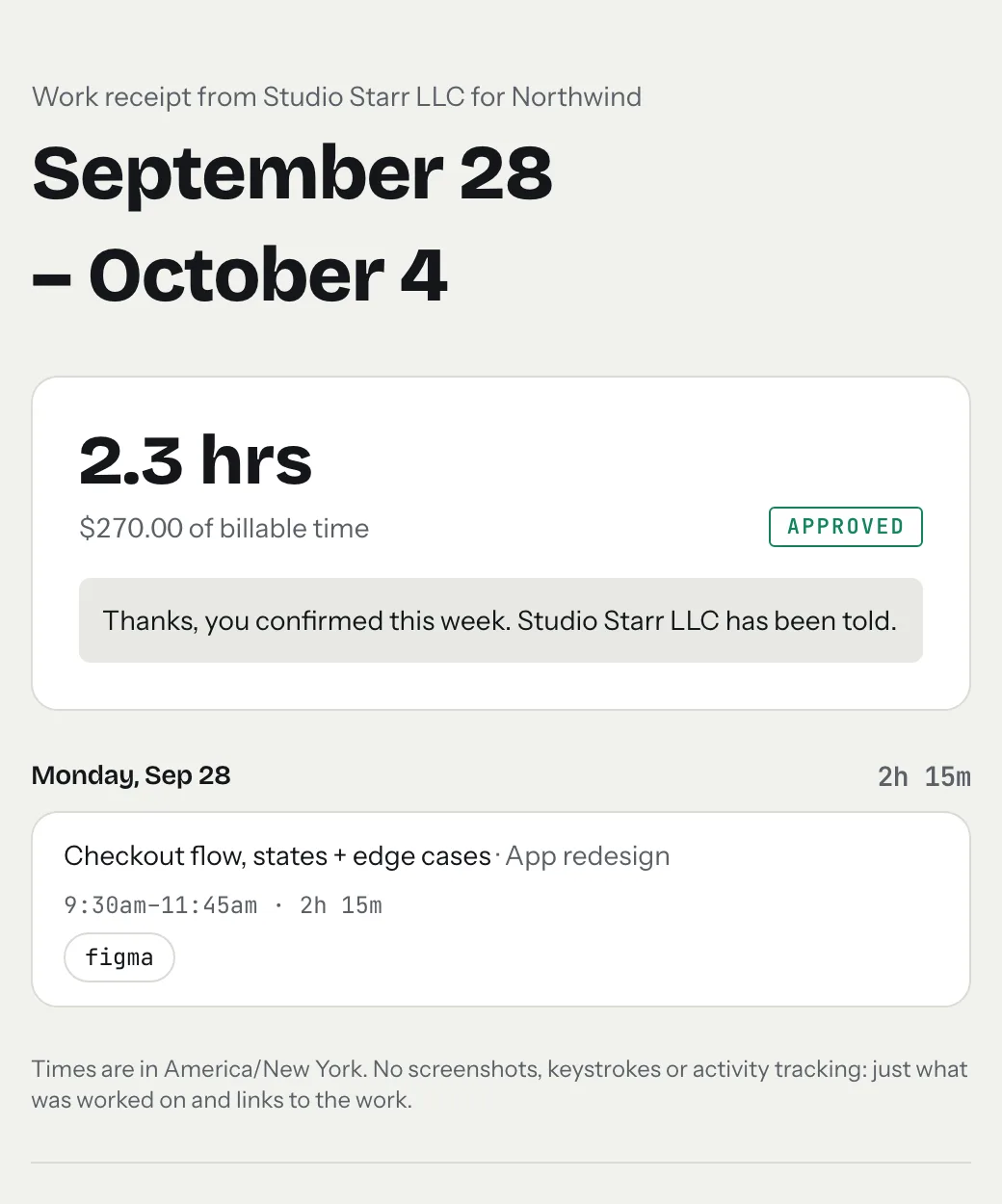
The client answers in one tap: "Looks right", or "I have a question", which asks them to write what the question is, so you know exactly what to look at. Either answer is emailed to you. Approved weeks show as client-approved on the invoice. If you change hours in an approved week afterwards, the week is marked changed, and it doesn't count as approved until you send it again and the client confirms.
What the receipt never shows: screenshots, keystrokes or activity scores. It is proof of the work through the work itself, which most clients trust more than a surveillance report and most freelancers find far easier to live with.
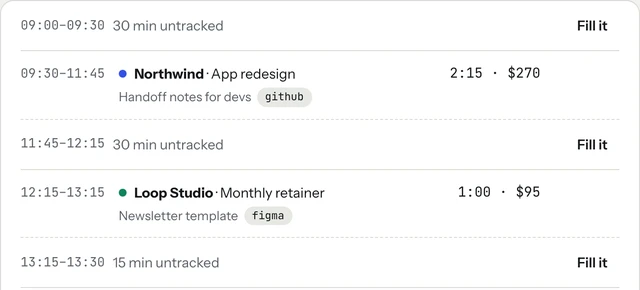
Good notes make good receipts. When you stop the clock, write what you did in words the client would use, and paste the link to the file or pull request. The receipt, and later the invoice, is built from those notes.
Between updates: the live tab
Some clients want to look in more often than once a week. For them, tab has a live tab: one private link per client, no sign-up for them. It shows whether you are on the clock for them right now, the billable time not invoiced yet with your notes and work links, the total so far, and any open invoice with its pay button. It refreshes on its own.
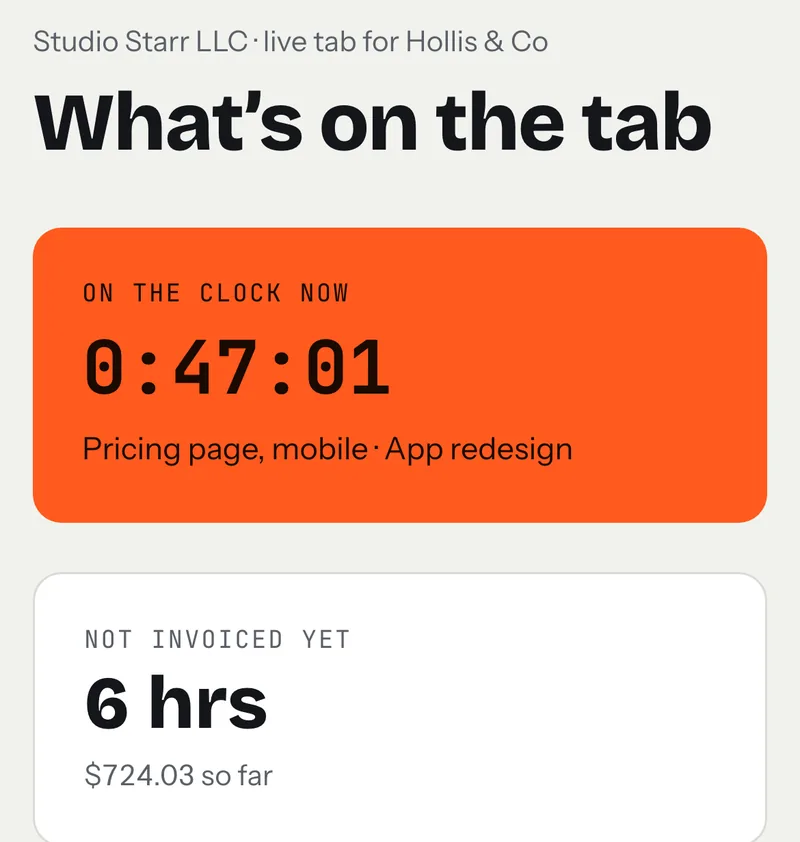
You stay in control of it. You can hide amounts so the client sees hours only, non-billable time never shows, and turning the link off stops it working straight away. Think of it as the shop window with the lights on all the time, and the weekly receipt as the moment you walk the client through it.
Then the invoice is just the total
At the end of the month, or whenever you bill, the invoice holds no news. The client has seen each week, approved most of them, and could check the running total whenever they liked. In tab, "Close the tab" turns the unbilled hours into a draft invoice you check before it goes out. Without tab, timesheet to invoice turns a list of hours into line items, and the invoice generator makes the invoice itself.
If an invoice does go quiet anyway, here is a follow-up schedule with the exact wording to use.
A simple weekly routine
- Track time per client as you work, with a note and a link on each entry. The meter on the homepage runs without an account if you want to try it.
- On Friday, look over the week. Fix anything you forgot to start or stop.
- Send each active client their work receipt, with a two-line note on what's next and anything you need from them.
- Read the answers on Monday. Handle any question before you start new work.
Keep reading
 Freelance contract basicsThe six things to settle in writing before you start, and where the law requires it.
 Saying no to clientsFour kinds of no (later, smaller, at my rate, not me) and the words for each.
 Client red flagsWarning signs in a new client, the money ones to take seriously, and a polite test.
Questions
What should a weekly client update include?
The hours for the week by project, a line for each piece of work, links to the work itself, the plan for next week, and anything you need from the client. Keep it short enough to read in a minute.
How often should freelancers update clients?
Weekly suits most ongoing hourly work: often enough that the invoice holds no surprises, rare enough not to become noise. Send it on the same day each week so it becomes a habit.
How do I prove my hours to a client without screenshots?
Show the outputs: a note for each block of time and a link to the file, pull request, doc or video it produced. tab's weekly work receipts do this, and the client confirms the week with one tap.
Does my client need a tab account to see the receipt or live tab?
No. Both are private links that work on their own. Share them only with that client, and you can turn a live tab link off at any time.
Let the client see the work as it happens.
tab turns your tracked hours into a weekly work receipt the client approves in one tap. Free to start, no account to try it.
Start free Try it, no sign-upFree to startNo cardNo screenshots, ever