Notes · pricing
One pea on a big plate: setting a minimum project fee
Small jobs carry the same emails, setup and invoicing as big ones. Here is how to price that in, and what to say.
Updated 2026-10-27
Picture one pea in the middle of a big dinner plate. The plate still has to be set, served and washed, no matter how little is on it. Small freelance jobs work the same way. A one-hour fix still needs the emails, the quote, the setup, the invoice and sometimes a reminder to pay it. Do enough of them and your week fills up while your income stays flat.
A minimum project fee is the smallest amount you will take on any job. It's one of the simplest pricing rules a new freelancer can set, and it quietly protects your time. Here is how to work out yours, how to word it, and when it makes sense to bend it.
Why small jobs cost more than they look
Every job carries work that has nothing to do with its size. Before you start there is the first message, a call or two, the quote and a short agreement. After you finish there is the handoff, the invoice, and maybe a follow-up. Call this the overhead of a job. On a 40-hour project an extra two hours of admin barely moves the numbers. On a one-hour job it can more than halve what you earn.
Some simple arithmetic shows it. Say you charge $100 an hour and a client asks for a one-hour change. You bill $100. But you also spent 30 minutes emailing about it, 15 minutes opening the files and 15 minutes on the invoice. That's two hours for $100, so your real hourly rate on that job was $50.
Payment fees add a little more. Card fees usually include a fixed part per payment, so they take a bigger share of a small invoice. Stripe's standard US card price is 2.9% + 30¢ per successful payment (Stripe pricing). On a $50 invoice that's $1.75, or 3.5%. On a $1,500 invoice it's $43.80, about 2.9%. Not a reason on its own to turn work down, but one more cost that weighs on small jobs. The payment fee calculator shows it for any amount.
Checked October 26, 2026.
How to work out your minimum
- Find your overhead. For your next few small jobs, track the time around the work as well as the work itself: the emails, the calls, the setup, the invoice. Track it as non-billable so you can see it (billable vs non-billable time explains how). Most people are surprised by the total.
- Pick the smallest job worth doing. Ask yourself what the shortest piece of real work is that you would happily take, for example two hours.
- Add them up and multiply by your rate. Two hours of work plus one and a half hours of overhead at $90 an hour is $315.
- Round up to a clean number. $315 becomes $350. A round number is easier to say out loud and easier to defend.
If you don't have an hourly rate yet, start with the hourly rate calculator or the rate guide for your kind of work.
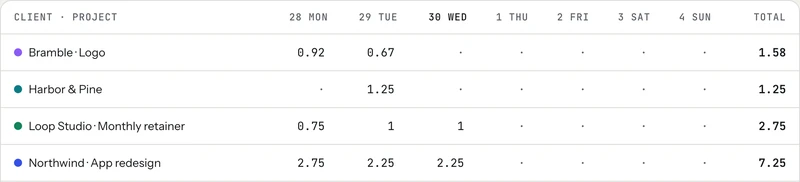
Three ways to set a minimum
- A minimum project fee. "Projects start at $350." Best for work with a clear deliverable, like a logo, a landing page or an edit.
- A minimum number of hours. "Any request is billed at a two-hour minimum." Best for hourly work and quick fixes, and easy to apply to existing clients.
- A minimum per month. "Ongoing support starts at $500 a month." Best when a client sends many tiny requests. It turns a stream of small jobs into one predictable invoice, which is close to a retainer.
Pick one and use it the same way every time. Consistency is what makes a minimum feel like a policy rather than a mood.
How to word it
Say it before anyone asks, in plain words. On your website, in your rate sheet or at the bottom of a proposal:
When a small request comes in, you don't have to refuse it. Name the minimum and let the client decide:
That last line is the useful part. Often a client has three or four small things waiting. Grouping them into one job is better for both of you than three separate invoices.
When to bend the rule
- A good client's quick question. A two-minute answer to a regular client is part of a healthy relationship. Decide where your line is and keep it there.
- A real test project. If a new client wants a small first job before something bigger, a lower fee can be worth it. Say so in writing: "This first piece is a one-off at $200."
- Small asks that can wait. Collect them over the month and bill them together, so the minimum applies once.
If small requests keep arriving in the middle of a bigger fixed-price project, that's a different problem: scope creep.
Checking your minimum in tab
A minimum only works if it's based on your real numbers, and the real numbers come from tracking. In tab, you track time per client with one tap, including the non-billable time around a job. On a fixed-price project, tab divides the fee by every hour you tracked and shows what it really paid per hour, next to your normal rate:
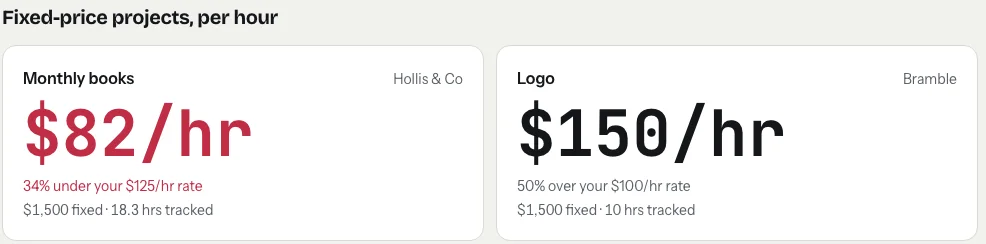
A few small jobs in red is a clear sign your minimum is too low. Two other settings help with small work. Each client can have its own rounding (to 6, 15 or 30 minutes per entry), which you can agree with clients who send lots of short tasks. And when you invoice, "Add a line" lets you add a fixed line such as "Minimum project fee" next to the tracked hours.
Start the clock, no accountSign up free
A minimum fee isn't about turning people away. It's about making sure the small plate is worth setting.
Keep reading
 Negotiate your rateAnchor first, offer options, and trade scope instead of discounts. With wording you can copy.
 What goes into a freelance rateTax, costs, time off, unbilled hours and profit: the layers on top of your old hourly pay.
 Retainers and depositsGet paid before (or as) you work: deposits, monthly retainers, and the words to use.
Questions
What is a minimum project fee?
It's the smallest amount a freelancer charges for any job, for example "projects start at $350". It covers the fixed work that comes with every job, like emails, setup and invoicing, so small jobs still pay.
How do I calculate my minimum project fee?
Add the hours of the smallest job you'd happily take to the overhead hours every job needs (emails, calls, setup, invoicing), multiply by your hourly rate, and round up to a clean number.
Should I have a minimum fee or a minimum number of hours?
A minimum project fee suits work with a clear deliverable. A minimum number of hours, such as a two-hour minimum per request, suits hourly work and quick fixes for clients you already have.
How do I tell a client about my minimum without losing them?
Put it on your site or rate sheet before anyone asks. When a small request comes in, name the minimum, explain what it covers, and offer to group other small tasks into the same fee.
See what your small jobs really pay.
Track the work and the overhead per client, and tab shows the real hourly rate on every fixed fee. Free to start, no account to try it.
Start free Try it, no sign-upFree to startNo cardNo screenshots, ever