Notes · pricing
How to negotiate your freelance rate without giving it away
Know your floor, anchor first, offer options, and trade scope instead of price. Plus wording for the moments that always come up.
Updated 2026-10-27
A client likes your work, then asks the question: "Can you do it for less?" If you are new to freelancing, the instinct is to say yes quickly so you don't lose the job. That first discount tends to stick, because the next quote to the same client starts from it.
Negotiating a rate is less like a fight and more like a game of chess: you think a few moves ahead, and you decide before the conversation what you will and won't give up. Here is how to set it up, the moves that work, and wording you can copy.
Before you talk: know your floor
You can't hold a rate you haven't worked out. Your floor is the lowest hourly rate that covers your income, the tax an employer used to pay, your costs, time off and the hours nobody bills for. The layer-by-layer guide to a freelance rate walks through it, and the hourly rate calculator does the math. Your profession's rate guide shows what employees in the same role earn, as a sanity check.
Write down two numbers before any call: the rate you will quote, and the floor you won't go under. If the conversation drifts below the floor, the answer is a polite no, not a slightly smaller discount.
Move 1: anchor first, with a number you can explain
Whoever names a number first sets the frame for the rest of the conversation. When a client asks "what's your budget?" or "what do you charge?", give your rate plainly and give one reason for it. Don't open with a range: the client will hear the bottom of it.
"My rate for this kind of work is $110 an hour. That covers design, two rounds of revisions and the files your developer needs."
Then stop talking. Silence after a number feels long, but filling it with "but I'm flexible" gives away the anchor you just set.
Move 2: offer options instead of one price
A single quote invites a yes or a no. Two or three options turn the question into "which one?", and each option can carry a different scope rather than a different rate for the same work.
All three use the same $110 rate. The client chooses how much work to buy, and you never have to argue about what an hour is worth. If you quote fixed prices, base each option on a time estimate you trust; the guide to estimating project time covers how.
Move 3: trade scope, not rate
When a client says the price is too high, the most useful reply is a question: "Which part matters most to you?" Then take work out to meet the budget, instead of doing the same work for less. Things you can trade:
- Fewer deliverables. Two page designs instead of four, or one ad size instead of five.
- Fewer revision rounds. One round included, extra rounds billed by the hour.
- A longer timeline. Rush work costs more; a relaxed deadline can cost less, because you can fit it around other clients.
- Less of your involvement. The client writes the first draft of the copy, or handles the developer handoff themselves.
"I can't lower the rate, but I can fit your budget. If we keep it to the homepage and one round of changes, it comes to $1,650. We can add the other pages later."
If you do decide to give something, get something back: a bigger first payment, a longer commitment, a testimonial, or permission to show the work in your portfolio.
Wording for the moments that come up
"Your rate is higher than the last person we hired."
"That makes sense. Rates vary a lot. Mine includes [what you include]. If it helps, I can suggest a smaller first piece so you can see how I work before committing to the whole project."
"We only have $800 for this."
"Thanks for telling me. For $800 I can do [smaller scope]. The full version we discussed is $2,000. Which would you like?"
"Can you do this one cheaper, and we'll send more work later?"
"I'd love to work together on more. I keep my rate the same from the start, so there are no surprises later. If there's a lot of work coming, we can talk about a monthly retainer."
When the answer is no.
"I understand, and I don't think I'm the right fit for this budget. If things change, I'd be glad to hear from you." Walking away politely is a legitimate move, and sometimes the client comes back.
Raising the rate with a client you already have
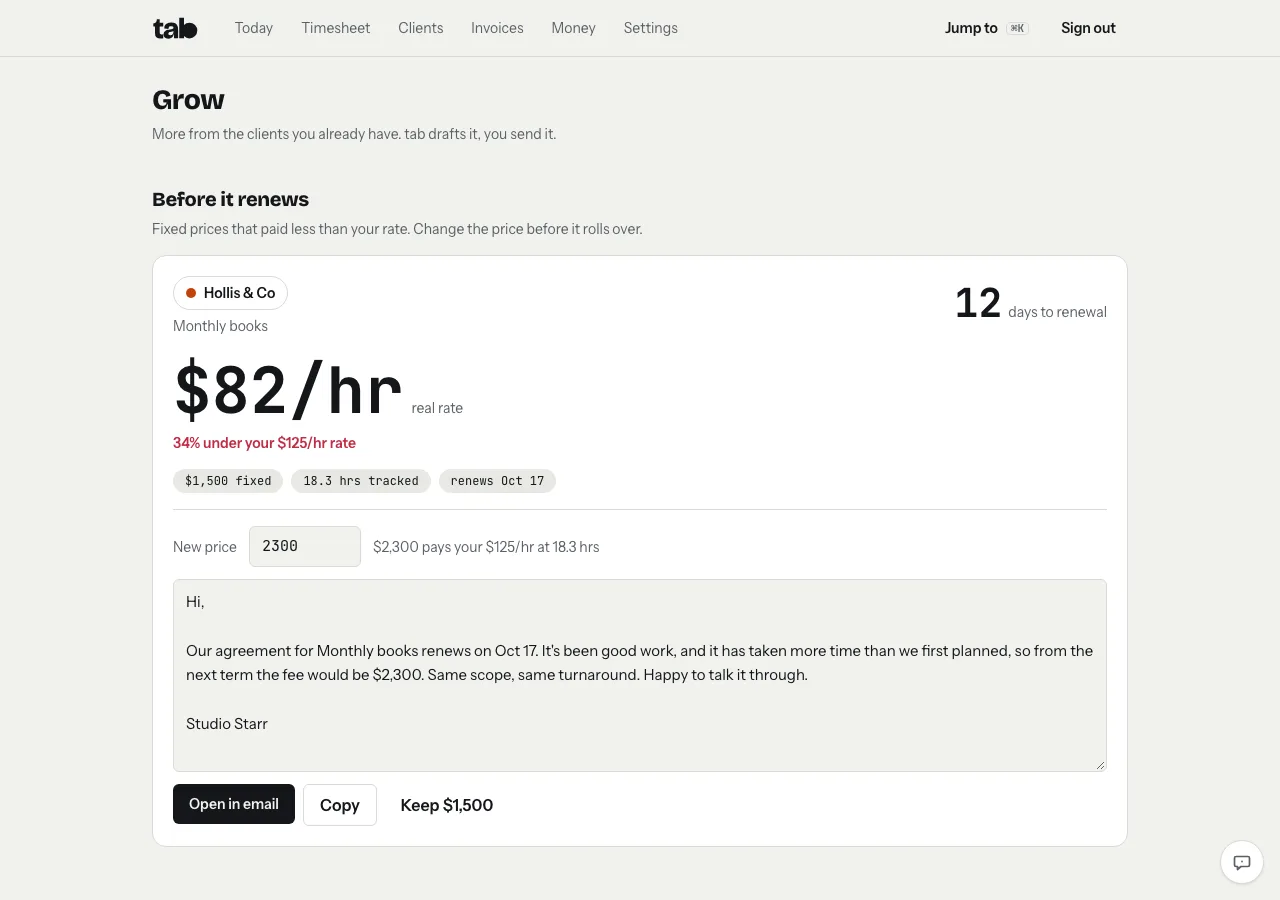
Negotiation doesn't end when you sign. If a fixed-price job keeps taking longer than planned, the moment to fix the price is before it renews, and the strongest case is your own tracked hours: "this has taken more time than we planned, so the fee for the next term is $X."
tab does that math for you. Its Grow screen lists fixed-price work that paid less than your rate and renews within 30 days, suggests a new price from the hours you tracked, and drafts a short note you can edit and send from your own email.
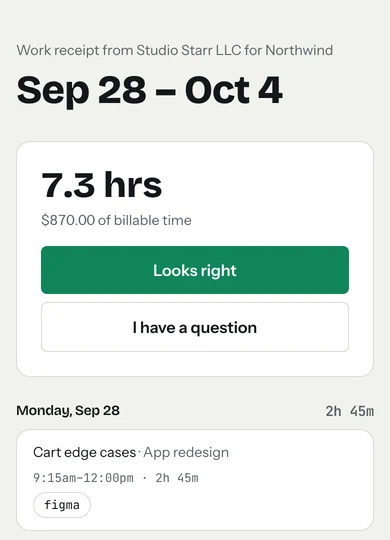
Showing the work also makes the price easier to accept. A weekly work receipt lists what you did, with links to the real files, and the client approves it with one tap.
Get the agreed rate in writing
Whatever you agree, write it down in an email or a short contract: the work, the rate or price, and when you will be paid. In some places this is the law. In New York City, freelance contracts worth $800 or more, including several jobs that add up to $800 within 120 days, must be in writing and must state the work, the pay and the payment date (NYC Department of Consumer and Worker Protection). The contract basics note lists what else to include. This is general information, not legal advice.
Checked October 26, 2026. Rates and scopes in the examples are illustrations, not market data.
Then bill every hour you agreed to
A good rate is wasted if hours go untracked. Start a timer on the homepage meter with your client and rate, no account needed, and turn the hours into an invoice with the timesheet to invoice tool.
Keep reading
 What goes into a freelance rateTax, costs, time off, unbilled hours and profit: the layers on top of your old hourly pay.
 Retainers and depositsGet paid before (or as) you work: deposits, monthly retainers, and the words to use.
 Your real hourly rateFlat fee ÷ every hour it took. How to count honestly, and what to do when it's low.
Questions
How do I respond when a client asks for a lower rate?
Keep the rate and change the scope. Ask which part of the project matters most, then offer a smaller version that fits their budget at your normal rate. If you do give something, ask for something back, like a larger deposit or a longer commitment.
Should I give a client a price range?
Usually not. Clients tend to hear the bottom of a range. Give one clear number with a short reason, or two or three options with different scopes at the same rate.
Is it OK to walk away from a client who won't pay my rate?
Yes. Decide your floor before the conversation. If the budget is below it, decline politely and leave the door open. Taking work below your floor costs you time you could bill elsewhere.
How do I raise my rate with an existing client?
Give notice before the next project or renewal, state the new rate plainly, and point to the work: your tracked hours or what the project actually took. Keep the note short and offer to talk it through.
Hold your rate with real numbers.
tab tracks your hours per client and shows what each project really paid, so the next price talk starts from facts. Free to start, no account to try it.
Start free Try it, no sign-upFree to startNo cardNo screenshots, ever