Notes · pricing
How to estimate how long a project will take
Break it down, check it against your own history, add a buffer on purpose, and re-estimate as you go. With a worked example.
Updated 2026-10-27
Every fixed price and every "about how long will this take?" rests on a time estimate. Get it right and the project pays what you planned. Get it wrong and you find out at high noon, on deadline day, with the hardest part still ahead and the budget already spent.
Estimating is a skill, not a talent, and it gets better with a simple routine: break the work down, check it against your own history, add a buffer on purpose, and re-estimate as you go. Here is each step, with an example you can copy.
Step 1: break the project into pieces you can picture
"Build a website" is impossible to estimate. "Design the homepage" is easier. "Design the homepage header and hero, desktop and phone" is something you can actually picture doing, and that is the level you want.
A good rule: keep breaking a task down until each piece is something you could finish in a day or less. Then estimate each piece on its own and add them up. Small pieces are easier to guess, and the errors tend to cancel out instead of piling up in one big number.
Don't forget the work around the work. These pieces are real hours and are easy to leave off:
- Kickoff call, questions and reading the client's material.
- Setting up files, accounts and access.
- Rounds of feedback and changes (count them, see step 3).
- Meetings and status updates during the project.
- Preparing the final files and handing them over.
Step 2: use your own tracked history, not a guess
The most reliable estimate comes from how long the same kind of work took you last time. Not how long it should take, and not how long it takes someone else: how long it actually took you, including the interruptions.
That only works if you tracked it. When you track time per client and per project, every finished job becomes a reference for the next one. A weekly timesheet makes the pattern easy to see.
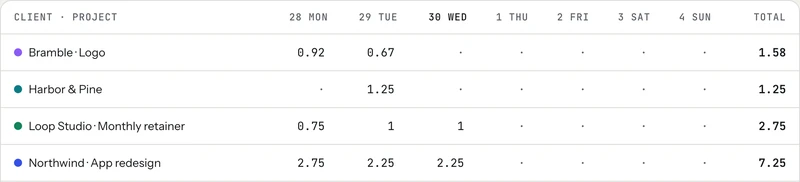
If you are just starting and have no history yet, track the first few projects carefully, even ones you bill at a flat fee. You can also write down your estimate before each task and compare it with the time you track. After a handful of jobs you will see your own pattern, such as underestimating revisions or overestimating writing.
No account needed to start building that history: the meter on the homepage times work against a client and rate right in your browser.
Step 3: add a buffer, and say what it covers
Every project has things you can't foresee: slow feedback, a missing file, a change of mind. A buffer is how you pay for them without working for free. Add it after you total the pieces, as a separate line, rather than padding each task quietly.
How big? Your history is the honest answer: if your tracked projects usually run over your first estimate by a certain share, that share is your buffer. Unfamiliar work, a new client or vague requirements all deserve a bigger one. Revisions deserve their own line: estimate one round, multiply by the number of rounds your contract includes, and bill extra rounds separately. The contract basics note covers how to write that down.
A worked example, with illustrative numbers:
Step 4: turn hours into a price
For hourly work, share the estimate as a range of hours and keep the client updated as you go. For a fixed price, multiply the estimate, buffer included, by your hourly rate. If that rate isn't settled yet, what goes into a freelance rate walks through it and the hourly rate calculator does the math. If the client pushes on the total, trade scope rather than hours; how to negotiate your rate has wording for that.
Step 5: re-estimate while the project runs
An estimate is a plan, not a promise you have to keep silently. Check it at set points: after the first quarter of the work, and whenever the scope changes. If you are already past half the hours with less than half done, say so early: "This is taking longer than planned because of X. To stay on budget, we could drop Y, or I can quote the extra."
In tab, you can give any project an estimate in hours. The client page shows the hours used against it, and the Money screen lists your projects under "Estimates vs actual," so you see a project running long while there is still time to talk about it.
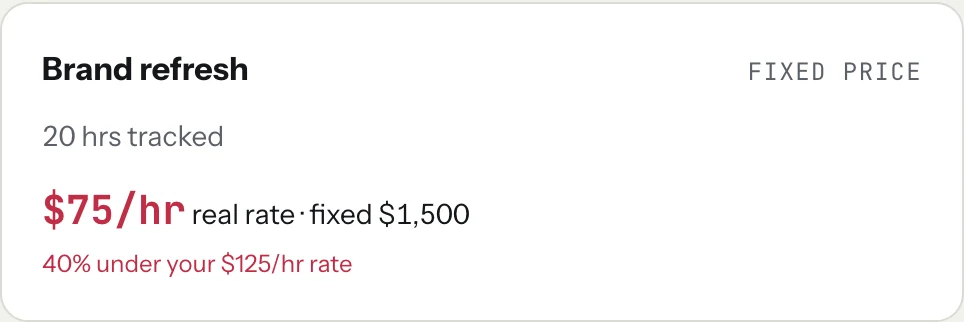
For fixed-price work, tab also shows what the project is really paying per hour so far, from every hour you tracked, next to your normal rate.
Step 6: close the loop when it's done
When a project ends, take five minutes to compare the estimate with what you tracked, piece by piece. Which parts ran long? Which were faster? Write it down next to the estimate. That comparison is what makes the next estimate better, and over time it turns your history into your best pricing tool. You can export every time entry as a CSV file if you like to keep the numbers in a spreadsheet.
And when the hours are in, turn them into a bill: the timesheet to invoice tool makes line items from your hours.
Start the clock, no accountSign up free
Checked October 26, 2026. Hours and prices in the examples are illustrations, not market data.
Keep reading
 Negotiate your rateAnchor first, offer options, and trade scope instead of discounts. With wording you can copy.
 What goes into a freelance rateTax, costs, time off, unbilled hours and profit: the layers on top of your old hourly pay.
 Retainers and depositsGet paid before (or as) you work: deposits, monthly retainers, and the words to use.
Questions
How do I estimate how long a freelance project will take?
Break the project into pieces of a day or less, estimate each piece, and add them up, including calls, feedback rounds and handoff. Compare with how long similar work took you before, add a buffer as a separate line, and re-check the estimate as the project runs.
How much buffer should I add to a project estimate?
Use your own history: if your tracked projects usually run over your first estimate by a certain share, use that share. New clients, unfamiliar work and vague requirements deserve a bigger buffer. Show it as its own line instead of padding every task.
What if a project is taking longer than I estimated?
Tell the client early, explain why, and offer choices: drop part of the scope to stay on budget, or approve extra hours or a change in price. Raising it halfway through is far easier than at the deadline.
Should I track time on fixed-price projects?
Yes. Tracking shows what the project really paid per hour and builds the history that makes your next estimate more accurate. In tab, a fixed-price project shows its real hourly rate next to your normal rate as you track.
Build the history your estimates need.
tab tracks time per client and project, shows estimates against actual hours, and turns the hours into an invoice. Free to start, no account to try it.
Start free Try it, no sign-upFree to startNo cardNo screenshots, ever