Notes · clients
It started as one small change: handling scope creep
Define where the job ends, name each change when it arrives, and bill the extras by the hour. With the words to use.
Updated 2026-10-27
It never starts as a big ask. It starts as one small change: a different button colour, one more page, "while you're in there, could you also...". Each request takes twenty minutes. Nobody writes them down. By the end of the project you've done a second project's worth of work for the first project's price, and the client has no idea, because each request felt tiny to them too.
That is scope creep, and it is rarely anyone's bad intent. It happens when nobody wrote down where the job ends, and nobody counted the extras as they went. Both are fixable. Here is how to define scope, handle change requests without sounding difficult, and get the extras paid.
Step 1: write down where the job ends
You can only call something "extra" if the original job was written down. Before work starts, agree on:
- What you will deliver. Specific items: "a five-page website: home, about, services, contact, blog index", not "a website".
- How many revision rounds are included. For example, two rounds of changes on each deliverable. Define a round: one set of consolidated feedback, sent together.
- What is not included. Copywriting, stock photos, extra pages, ongoing maintenance. Naming the obvious extras now saves an argument later.
- The price and when you get paid. And what happens to anything outside the scope: "Work outside this scope is billed at $95 an hour, agreed before it starts."
Some places require a written contract anyway. In New York City, under the Freelance Isn't Free Act, contracts worth $800 or more (including work for the same client that adds up to $800 within 120 days) must be in writing, and the contract must spell out the work you will perform, the pay for the work, and the date you get paid. That is a summary of the official page, not legal advice, but it is a good minimum for any contract wherever you work. This note on freelance contract basics covers the rest.
Checked October 26, 2026. Source: NYC Department of Consumer and Worker Protection, Freelance Isn't Free Act.
Step 2: name the change when it arrives
The moment to deal with a small change is when it is asked for, not on the invoice. You don't need to refuse it. You need to say, kindly, that it sits outside what was agreed, and offer a way to do it. Three ways to reply, depending on the size:
Notice what these do. Each one is friendly, names the change as outside scope, and puts a number on it before the work happens. The client gets to decide with full information, and a client who agreed to the number up front has nothing to be surprised by on the invoice.
Get the yes in writing, even if it is one line in an email. "Yes, go ahead" is enough. Keep it with the project, because it is your record if the invoice is ever questioned.
Step 3: bill the extras by the hour
Changes are hard to price in advance, because you rarely know how far "one small change" goes until you are in it. That is why hourly billing suits extras even when the main project is a flat fee: agree the rate up front, track the time as you do it, and bill what it actually took.
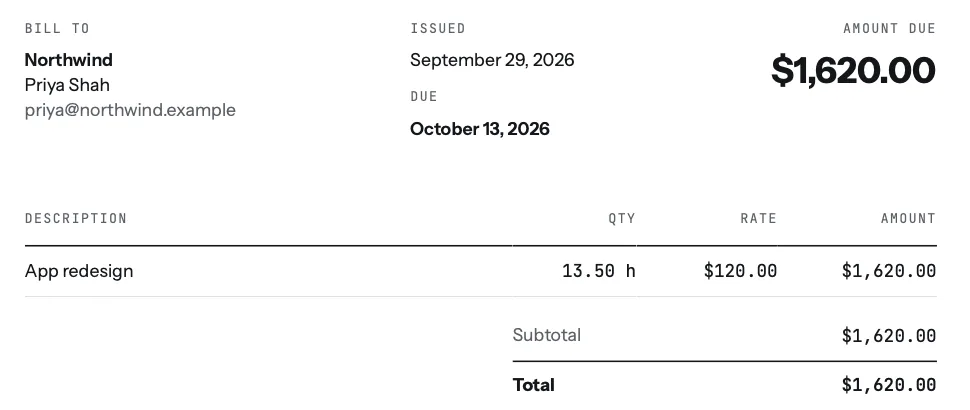
For this to work you have to track the extras separately, as they happen. A useful habit: put change requests on their own project for that client, such as "Website: changes", so they never blend into the original job. On the invoice they then appear as their own line, with your notes showing what each change was.
In tab, that is how it works in practice. Every extra hour you track goes on the client's tab, with a note and a link to the work, and the weekly timesheet shows it beside everything else.

When you close the tab, those hours become lines on a draft invoice you check before it goes out. If you'd rather not use an app, the timesheet to invoice tool turns a list of hours into line items, and the invoice generator makes the invoice.
On a fixed fee, watch the real rate
Scope creep hurts most on fixed-price work, because every unbilled change silently lowers what you earned per hour. Track your time on fixed-price projects too, not to bill it, but to see what the price really paid. In tab, each fixed-price project shows its real hourly rate as you work (the fee divided by every hour tracked), next to your usual rate, in red when it falls more than 10% under.
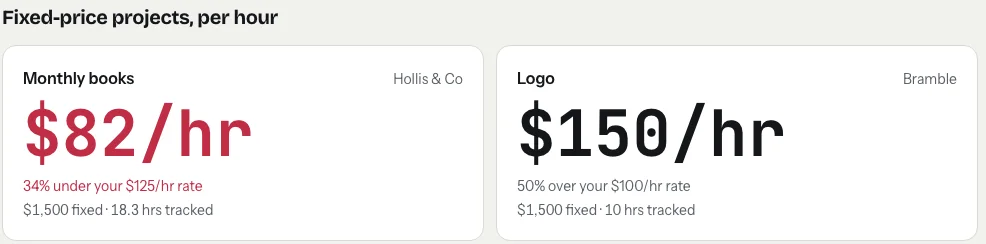
When that number starts dropping, it is your cue to have the change-order conversation, before the project ends rather than after. Try your own numbers on the real rate page. For the next quote, the hourly rate calculator and the rate guides help you price with room for the revisions you now know to expect.
A quick scope creep checklist
- Write down deliverables, revision rounds, exclusions and your rate for extras before work starts.
- When a change arrives, name it as outside scope and give a number before doing it.
- Get a written yes, even a one-line email.
- Track extras as their own project, as you do them.
- Bill them as their own line, with notes, on the next invoice.
Want to see how much those small changes add up to? Start a clock on the homepage meter; it runs without an account.
Keep reading
 Freelance contract basicsThe six things to settle in writing before you start, and where the law requires it.
 Weekly client updatesWhat to send every Friday so the invoice is just the total of things the client already saw.
 Saying no to clientsFour kinds of no (later, smaller, at my rate, not me) and the words for each.
Questions
What is scope creep in freelancing?
Scope creep is when a project grows beyond what was agreed, usually through small extra requests that each seem too minor to discuss. Over a project they can add up to a lot of unpaid work.
How do I say no to a small change without upsetting the client?
You don't need to say no. Say it's outside the original scope and give a number: 'Good idea. That's outside what we agreed; it would take about 4 hours at my usual rate. Want me to go ahead?' Then wait for a written yes.
Should I charge for small changes on a fixed-price project?
If they are outside the agreed scope, yes. Agree an hourly rate for extras in the contract, track the time on them separately, and bill them as their own line on the next invoice.
How many revision rounds should a freelance contract include?
There is no standard number; many freelancers include one or two rounds per deliverable. What matters is writing the number down and defining a round, such as one set of consolidated feedback sent together.
Put the small changes on the invoice.
tab tracks every extra hour to the right client, so the small changes end up billed instead of in your evenings. Free to start, no account to try it.
Start free Try it, no sign-upFree to startNo cardNo screenshots, ever