Notes · pricing
The scariest number this week: your real hourly rate
Divide the flat fee by the hours it really took. How to count those hours honestly, and what to do when the answer is low.
Updated 2026-10-27
A flat fee feels simple. You quote $1,500 for the logo, the client says yes, and you know exactly what you'll be paid. What you don't know yet is how long it will take. That second number decides whether the job was a good deal, and most freelancers never work it out.
Your real hourly rate is the fee divided by the hours the job actually took. It is the number that tells you which prices to raise, which jobs to say no to, and how to quote the next one. Here is how to measure it honestly, and what to do when it comes back lower than you hoped.
The formula: fee ÷ every hour
The math is one line:
Real hourly rate = what the client paid ÷ the hours you spent on the job.
A $1,500 project that took 18.3 hours paid about $82 an hour. The same $1,500 project done in 10 hours paid $150 an hour. Same price, same client happiness, very different business.
If you want to try your own numbers right now, the real rate calculator does it in two fields. The rest of this note is about getting the two inputs right, because that is where most people fool themselves.
What counts as an hour
The fee is easy: it's on the invoice. The hours are where the number gets flattering if you let it. Count everything the job took from you, not only the time you spent making the thing:
- Calls and meetings. The kickoff call, the check-ins, the "quick question" that turned into forty minutes.
- Email and messages. Writing updates, answering feedback, chasing a missing file.
- Revisions. Every round, including the ones that were "just small changes".
- Setup and research. Reading the brief, gathering references, learning the client's tools.
- Admin for this job. Writing the proposal, sending the invoice, following up on payment.
Leave out general business time that isn't about this client, like updating your portfolio. That belongs in your overall rate, not in one project's.
The only reliable way to get these hours is to track them while you work. Estimating at the end of a project almost always comes out short, because the small pieces (a ten-minute reply here, a revision there) are the ones memory drops. Tracking a flat fee isn't about billing those hours. It's about seeing them.
What to compare it to
A real rate means nothing on its own. Compare it to the hourly rate you would charge for the same work billed by the hour. If you don't have one yet, the hourly rate calculator works it out from your costs and the hours you can actually bill, and the rate guides show typical ranges by profession.
Remember that your hourly rate is not take-home pay. In the US, self-employed people pay self-employment tax of 15.3% (12.4% for Social Security and 2.9% for Medicare) once net earnings reach $400 a year, on top of income tax, according to the IRS. Payment processing fees come out too; the payment fee calculator shows how much. A flat fee that looks fine as a total can land well under what you need once those come off.
A simple test: if the real rate is more than about 10% under your usual rate, treat the project as underpriced. That's also the line tab uses to turn the number red.
Checked October 26, 2026. General information, not tax advice.
Seeing it as you work in tab
In tab you add a fixed-price project with its fee, then track time on it like any other job: tap the client when you start. tab doesn't bill those hours; it divides the fee by every hour you tracked, billable or not, and shows the result next to your normal rate. The Money page lists every fixed-price project with tracked time, lowest rate first.
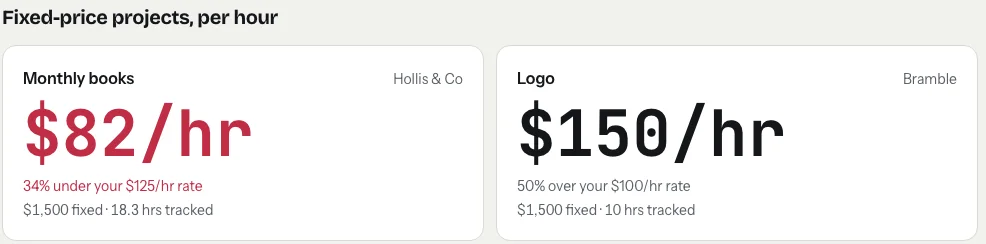
Because it updates as you track, you can see a project drifting while there's still time to do something about it, not after the invoice is paid.
Start the clock, no accountSign up free
What to do when the number is low
A low real rate is information, not a failure. It tells you exactly where the hours went. Pick the fix that matches the cause:
The scope grew
If the extra hours came from work outside the original brief, the fix is in the next proposal: write down what's included, how many rounds of revisions, and what happens after that. For a project still running, you can name it plainly: "This is outside what we agreed. I can do it for $X, or we can keep to the original scope."
The estimate was off
If the client didn't ask for more and the work simply took longer, your price was based on a guess. Now you have a real number. Next time, quote from it: hours from similar past projects × your hourly rate, plus a margin for the unknowns.
The work repeats
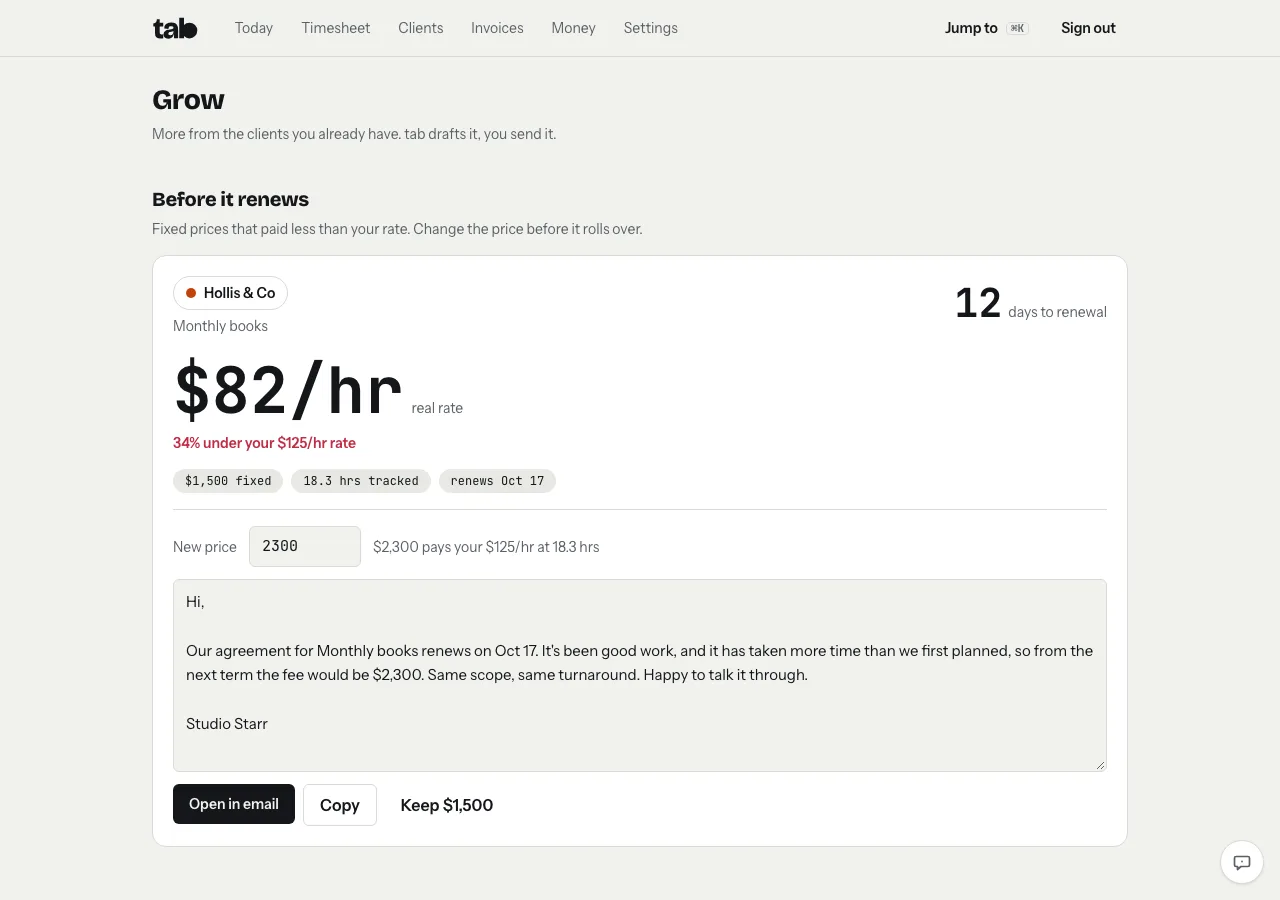
For monthly or recurring fixed fees, the best time to fix the price is at renewal. Keep the scope, change the number, and give the client notice. A short note works:
That wording comes from tab's Grow screen. Give a fixed-price project a renewal date, and if it ran under your rate, tab flags it in the weeks before, suggests the price that would pay your rate (hours tracked × your rate, rounded up to the next $100), and drafts the note. You send it yourself, from your own email.
The client is simply a bad fit
Some clients will always need more rounds and more calls than the fee covers. Once you have two or three projects of real numbers, you can decide with facts: raise the price for that client, or let the work go to make room for better-paid jobs.
Make it a habit, not a one-off
One project's real rate is a data point. A few months of them is a pricing strategy. Track every flat-fee job, look at the list once a month, and adjust the prices at the bottom. If you work for one client across several jobs, track each one as its own project so the numbers don't blur together; tracking time by project explains how. And when you're ready to start, the meter on the homepage runs in your browser with no account.
Keep reading
 Negotiate your rateAnchor first, offer options, and trade scope instead of discounts. With wording you can copy.
 What goes into a freelance rateTax, costs, time off, unbilled hours and profit: the layers on top of your old hourly pay.
 Retainers and depositsGet paid before (or as) you work: deposits, monthly retainers, and the words to use.
Questions
How do I calculate my real hourly rate on a flat-fee project?
Divide what the client paid by every hour the project took you, including calls, emails, revisions and admin. A $1,500 project that took 18.3 hours paid about $82 an hour.
Should I track time on fixed-price projects?
Yes, not to bill it but to see what the project really paid per hour. It shows which prices to raise and how long similar work takes, so the next quote is based on real numbers.
What is a good real hourly rate?
One at or above the hourly rate you would charge for the same work. If it's more than about 10% under, the project was underpriced and the fee should go up next time or at renewal.
How do I raise a flat fee with an existing client?
Do it at renewal, with notice. Keep the scope the same, give the new price, and say it plainly: the work has taken more time than first planned, so the fee for the next term is the new amount.
Know what every flat fee really pays.
Add your fixed-price projects, track like normal, and tab shows the real hourly rate on each one. Free to start, no account to try it.
Start free Try it, no sign-upFree to startNo cardNo screenshots, ever