Notes · pricing
Hourly or flat fee? Picking the right road for each project
When to sell your time, when to sell a result, how to build a flat fee from an hourly rate, and how to know afterwards if you chose well.
Updated 2026-10-27
Every new project starts at the same fork in the path: do you charge by the hour, or name one price for the whole job? Neither road is the "professional" one. Both are normal, and many freelancers use both, client by client. What matters is picking the one that fits the work in front of you, and knowing what each one asks of you.
Here is how each model works, when each one tends to fit, a simple way to set a flat fee from an hourly rate, and how to check afterwards whether you chose well.
Hourly: you sell time
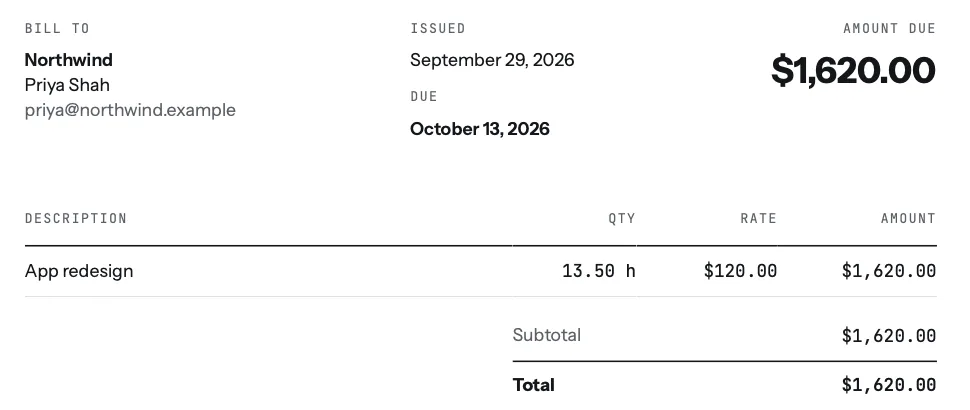
With hourly billing, the client pays for the time you spend. You agree a rate, you track your hours, and the invoice is hours times rate.
- Good for: work where the size isn't known yet, ongoing support, "can you help with a few things" requests, and anything the client is likely to change as it goes.
- What it protects: you. If the work grows, the bill grows with it. You don't need a perfect estimate up front.
- What it asks of you: honest, complete time tracking, and a way to show the client what the hours were for. Clients worry about open-ended bills, so a short weekly update and a rough range ("about 10 to 15 hours") go a long way.
- The catch: you earn more by taking longer, and less as you get faster. A skilled freelancer who finishes in four hours what used to take ten gets paid for four.
Flat fee: you sell a result
With a flat fee (also called a fixed price or project fee), you agree one price for a defined piece of work: a logo, a five-page website, a set of blog posts. The client knows the cost before you start.
- Good for: work you have done many times, with a clear finish line and a scope you can write down in a few lines.
- What it protects: the client's budget, and your upside. If you work efficiently, you keep the difference.
- What it asks of you: a clear scope, a set number of revision rounds, and a price for extra work, all in writing before you begin. The contract basics note lists what to settle.
- The catch: if the job takes twice as long as you planned, you are paid for half of it. "One small change" requests add up quietly; scope creep is the most common way a good flat fee turns into a bad one.
How to choose: four questions
- Can you describe the finished work in a few sentences? If yes, a flat fee is an option. If the answer is "it depends what we find", start hourly.
- Have you done this kind of job before, and tracked how long it took? Your own history is the best estimate you have. Without it, a flat fee is a guess.
- How likely is the client to change direction? Lots of stakeholders, an early-stage idea or a vague brief all point to hourly, or to a small paid first phase before any fixed price.
- What does the client prefer? Some clients have to approve a fixed budget before anything starts. Others are happy with a rate and a cap. Asking is fine.
There is also a middle road: an hourly rate with a cap ("billed hourly, not to exceed 20 hours without checking with you first"), or a flat fee split into parts, paid as you go. Retainers and deposits covers how to get part of a fixed price before you start.
Turning your hourly rate into a flat fee
A flat fee should still be built from an hourly number. It just isn't shown to the client. A simple way to do it:
- Estimate the hours, task by task, not as one big number. Include the parts that are easy to forget: calls, email, setup, file prep, revisions. The guide to estimating project time walks through it.
- Add a buffer for the unknowns, for example 20%. Projects run long far more often than they run short.
- Multiply by your hourly rate. If you don't have one yet, the hourly rate calculator works it out from the income you want, or see what others in your field charge in the rate guides.
- Round up to a clean number and write down exactly what it includes.
For example: 12 estimated hours, plus a 20% buffer, is about 14.4 hours. At $100 an hour that's $1,440, which you might quote as $1,500 for "a logo, three initial concepts, two rounds of revisions, final files in these formats". Anything outside that list is extra, at your hourly rate.
Track time either way
This is the part most freelancers skip on flat-fee work, and it's the most useful habit you can build. If you track every hour on a fixed-price project, you learn what the project really paid you per hour: the fee divided by every hour it took. That number tells you whether to quote the same price next time, raise it, or switch that kind of work to hourly. The real hourly rate note explains how to count honestly.
In tab, a project can be hourly or fixed price. On a fixed-price project you still start the timer as you work, and tab shows what the fee is paying per hour so far, next to your normal rate:
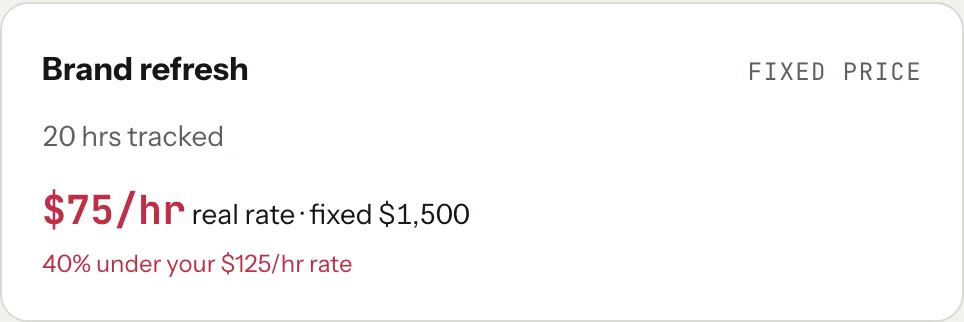
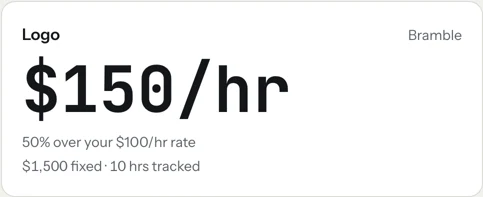
Both projects above were priced at $1,500. One paid half again your rate; the other paid well under it. Without the hours, they would look exactly the same. After a few projects you will know which kinds of work you price well as a flat fee and which ones should stay hourly. You can try the clock on the homepage meter without an account.
Start the clock, no accountSign up free
A simple starting rule
If you are new and unsure: charge hourly for anything new or vague, and offer a flat fee only for work you have done and tracked at least a couple of times. Track every hour on both. Let your own numbers move work from one road to the other.
Keep reading
 Negotiate your rateAnchor first, offer options, and trade scope instead of discounts. With wording you can copy.
 What goes into a freelance rateTax, costs, time off, unbilled hours and profit: the layers on top of your old hourly pay.
 Retainers and depositsGet paid before (or as) you work: deposits, monthly retainers, and the words to use.
Questions
Is it better to charge hourly or a flat fee as a freelancer?
Neither is better in general. Hourly fits work with an unclear size or lots of changes; a flat fee fits work you have done before with a clear scope. Many freelancers use both, depending on the project.
How do I turn my hourly rate into a project price?
Estimate the hours task by task, add a buffer for unknowns (for example 20%), multiply by your hourly rate, and round up. Then write down exactly what the price includes and what extra work costs.
Should I track time on fixed-price projects?
Yes. Dividing the fee by every hour you spent shows what the project really paid per hour, which tells you whether to raise the price next time or bill that kind of work hourly.
Can tab handle both hourly and fixed-price projects?
Yes. Each project is hourly or fixed price. On fixed-price projects you track time as usual and tab shows the real hourly rate next to your normal rate, and the fee can be split into parts billed one at a time.
Know what every project really paid.
Track hourly and fixed-price work in one place, see the real rate on every flat fee, and invoice either kind in one step. Free to start, no account to try it.
Start free Try it, no sign-upFree to startNo cardNo screenshots, ever