Notes · starting out
Side hustle to full-time: the four numbers to check first
Your real hourly rate, your monthly costs without an employer, your runway, and how much rides on one client. Work them out before you quit.
Updated 2026-10-27
The side hustle is working. Clients keep coming back, the evenings are full, and the thought arrives: what if this was the whole job? Before you hand in notice, sit down with four numbers. They take an afternoon to work out, and they tell you whether you are ready now, ready in six months, or need one more client first.
The four numbers are your real hourly rate, your monthly costs once there is no employer behind you, your runway, and how much of your income comes from one client. Here is how to work out each one, with example numbers you can swap for your own.
1. Your real hourly rate, not the one you quote
The rate on your invoice is not what you earn per hour. Every client has unbilled time attached: the intro call, the emails, the revision round you did not charge for, the invoice itself. On a side hustle this hides well, because it all happens in evenings you were not counting.
The fix is simple and a little uncomfortable: track every hour you spend on each client for a month, billable or not, then divide what they paid you by all of those hours. A client billed at $110 an hour who also takes a lot of unbilled hours can work out far lower, and that is the number your full-time plan has to run on.
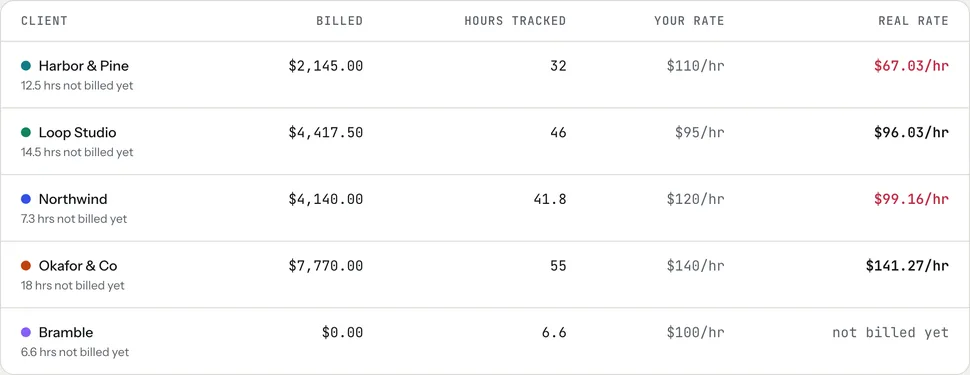
In tab, the Money screen does this division for every client and turns the real rate red when it is more than 10% under the rate you set. For flat-fee work, the real rate page shows what a fixed price paid per hour, and the hourly rate calculator works backward from the income you want.
Track one more thing while you are at it: how many hours a week were billable at all. A full-time week is not 40 billable hours. Some of it goes to finding work, admin and invoicing. Your own tracked side-hustle hours are the most honest guide you have to that split.
2. Your monthly costs, with no employer behind you
Leaving a job removes things you may never have priced. List what you will pay for yourself each month:
- Living costs. Rent or mortgage, food, bills, debt payments. Use your bank statements, not a guess.
- Health insurance. If your coverage comes through your job, you will need your own. In the US, self-employed people can buy a plan on the Health Insurance Marketplace, and whether you qualify for savings depends on your estimated income and household size. Losing job-based coverage generally opens a Special Enrollment Period, with a 60-day window to sign up. Get a real quote before you decide, because it can be one of your largest monthly costs.
- Self-employment tax. As an employee, your employer pays half of your Social Security and Medicare tax. Self-employed, you pay both halves: the self-employment tax rate is 15.3% (12.4% Social Security, 2.9% Medicare), and it applies once your net earnings from self-employment are $400 or more in a year. That is on top of income tax.
- Estimated tax payments. Nobody withholds tax from a client payment. If you expect to owe $1,000 or more when you file, the IRS generally expects you to pay estimated tax during the year, in four payment periods.
- Business costs. Software, equipment, insurance, a bookkeeper, payment fees. Small each, real together. The payment fee calculator shows what card and bank payments cost you.
A simple way to turn this into a target: add living costs, health insurance and business costs, then divide by what is left after setting money aside for tax. For example, with $4,000 of monthly costs and 25% set aside for tax, you would need about $5,333 a month coming in ($4,000 divided by 0.75). Your tax share depends on where you live and how much you earn; the freelance tax calculator gives you a starting estimate. This is general information, not tax advice, and a tax professional can tell you what applies to you.
Checked October 26, 2026. Sources: IRS, self-employment tax; IRS, estimated taxes; HealthCare.gov, coverage for the self-employed; HealthCare.gov, Special Enrollment Period.
3. Your runway
Runway is how many months you can cover your costs if work slows down. The math is one line: savings you are willing to spend, divided by monthly costs from step 2. With $16,000 saved and $4,000 a month in costs, that is four months.
Two things make runway shorter than it looks. First, clients pay late: an invoice due in 30 days can take longer, so money you earned in March may land in May. Second, the first months often include a quiet stretch while you replace the hours your job used to fill. Decide your number of months before you quit, and write down what you will do if you reach the halfway point without enough work.
Shorter payment terms help. Put a real due date on every invoice and make it easy to pay; this note on following up unpaid invoices has a schedule and wording for when one goes quiet.
4. How much rides on one client
Look at last year's income by client. If one client paid most of it, going full-time means your job now depends on someone else's budget, and they can end it with an email. Ask yourself plainly: if your biggest client left next month, how many months of runway would that cost you?
If the answer scares you, the side hustle stage is the cheapest time to fix it. Land a second and third regular client while you still have a salary. A good place to look first is people who already paid you; tab's Grow screen points at good clients who have gone quiet and drafts a short check-in for you to send.
Put the four numbers side by side
Then the test: real rate times the billable hours you can actually fill each month. If that clears the monthly target, with runway to cover the gaps, the numbers say go. If it doesn't, you now know exactly which number to work on.
What the tools cost while you grow
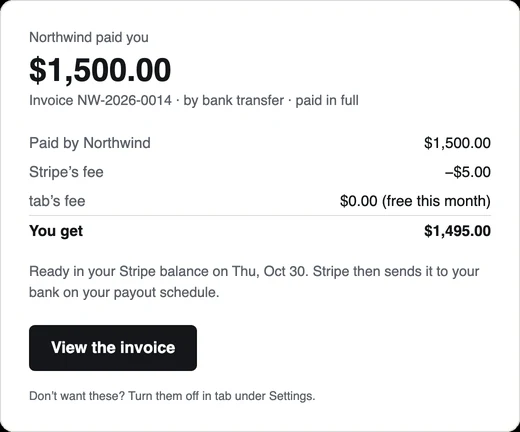
The poster for this note says tab is free until business is booming, and that is how the pricing works. Time tracking, clients, work receipts and invoices with your logo are free. When clients pay online through tab, there is no tab fee on the first $2,000 collected each calendar month, then 1% up to $10,000 and 0.5% above that. Stripe's own processing fee is separate, and payments you receive outside tab, like a check or a wire, are always free.
You can start tracking the side hustle today and have a month of real numbers by the time you need to decide. The meter on the homepage runs without an account.
Keep reading
 Start here57 free notes, sorted by what you need this week: first client, pricing, late payments, taxes.
 Open enrollment, self-employedThe 2027 dates, estimating an uneven income, and pricing health insurance into your rate.
 First client this week?The one-hour setup before you start: agreement, rate, payment terms, the clock, the invoice, tax.
Questions
How do I know if my side hustle can replace my salary?
Multiply your real hourly rate (what clients paid divided by every hour you spent on them) by the billable hours you can actually fill each month. If that covers your living costs, health insurance, business costs and tax, with savings to cover slow months, the numbers work.
How much tax do I pay when I'm self-employed in the US?
On top of income tax, self-employed people pay self-employment tax of 15.3% (Social Security and Medicare) once net earnings reach $400 in a year, and generally pay estimated tax during the year if they expect to owe $1,000 or more. This is general information; a tax professional can tell you what applies to you.
How do I get health insurance after leaving my job?
In the US, self-employed people can buy a plan through the Health Insurance Marketplace at HealthCare.gov. Losing job-based coverage generally qualifies you for a Special Enrollment Period, and savings are based on your estimated income and household size.
Is tab free for new freelancers?
Yes. Tracking, clients, work receipts and invoices are free. tab takes no fee on the first $2,000 a month that clients pay online through it, then 1% up to $10,000 and 0.5% above. Stripe's processing fee is separate, and offline payments are always free.
Get your real numbers before you quit.
Track every client in tab for a month and see what each one really pays per hour. Free to start, no account to try it.
Start free Try it, no sign-upFree to startNo cardNo screenshots, ever