Notes · starting out
First client this week? Set these up before you start
The agreement, the rate, the payment terms, the clock, the invoice and the tax money: an hour of setup that makes the first job pay.
Updated 2026-10-27
Someone said yes. You have a first client, a first project, and probably a start date that is closer than you would like. It is tempting to open the files and get going. Take an hour first. The few things you set up before the work starts decide whether this job ends with a clean invoice paid on time or a vague argument about what was included.
Here is the checklist, in the order to do it.
1. Put the agreement in writing
It doesn't need to be a long legal contract. It does need to be written down and agreed by both of you, even if that is an email that says "Sounds good". Cover these points:
- The work: what you will deliver, and what is not included.
- The price: your hourly rate, or the fixed fee and what it covers.
- Revisions: how many rounds are included, and what extra changes cost.
- Payment terms: when you invoice, when it is due, and how they pay.
- Who owns the work and when it transfers (often once the final invoice is paid).
In some places writing it down is the law. In New York City, freelance contracts worth $800 or more, including several jobs that add up to $800 within 120 days, must be in writing and must state the work, the pay and the date you get paid (NYC Department of Consumer and Worker Protection). New York State extended freelance protections statewide on August 28, 2024, and its Department of Labor publishes a model contract you can use as a starting point (New York State Department of Labor). This is general information, not legal advice.
Checked October 26, 2026.
2. Settle the rate before you settle in
New freelancers often price their first job at what they earned per hour as an employee. That leaves out everything an employer used to pay for: taxes, equipment, software, unpaid admin time and the weeks between clients. Run your number through the hourly rate calculator, then compare it with your profession's rate guide.
If the client wants a fixed price, estimate the hours honestly, add room for the unexpected, and price from that. Then keep tracking time anyway: it is the only way to know what the fee really paid per hour, which is what you need to price the next job better.
3. Decide your payment terms
Pick them now so they go in the agreement, not in an awkward email later.
- Invoice on a schedule. Weekly or every two weeks for hourly work; by milestone for fixed-price work (for example, a part at the start, a part at the midpoint, the rest on delivery).
- A real due date. "Net 14" (due 14 days after the invoice) is a clear, common choice.
- How they pay. A bank transfer usually costs you far less than a card. The payment fee calculator shows the difference on your invoice amount.
Expect a tax form too. US clients often ask a new contractor for a Form W-9, which is how you give them your correct taxpayer identification number for their information returns (IRS, About Form W-9).
Checked October 26, 2026.
4. Start the clock from minute one
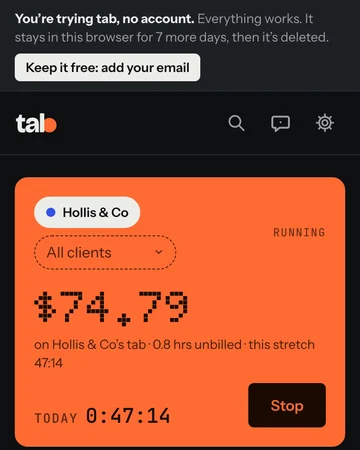
The first call, the setup, reading the brief, the quick email reply: if it is work for this client, track it. Hours that never get written down never get billed, and on a first project you are still learning how long things really take. That knowledge is worth as much as the invoice.
You don't need an account to begin. tab's trial opens on a running clock with no sign-up: time the job, keep notes on what you did, and turn the hours into an invoice you can download as a PDF. The trial lasts 7 days in that browser; add your email when you want to keep everything, send the invoice by email, or take payments online.
Start the clock, no accountSign up free
5. Send the first invoice the same way you'll send them all
Your first invoice sets the pattern. Make it look like a business sent it: your name or business name, the client's details, an invoice number, the date issued, the due date, a clear line for the work, and how to pay.
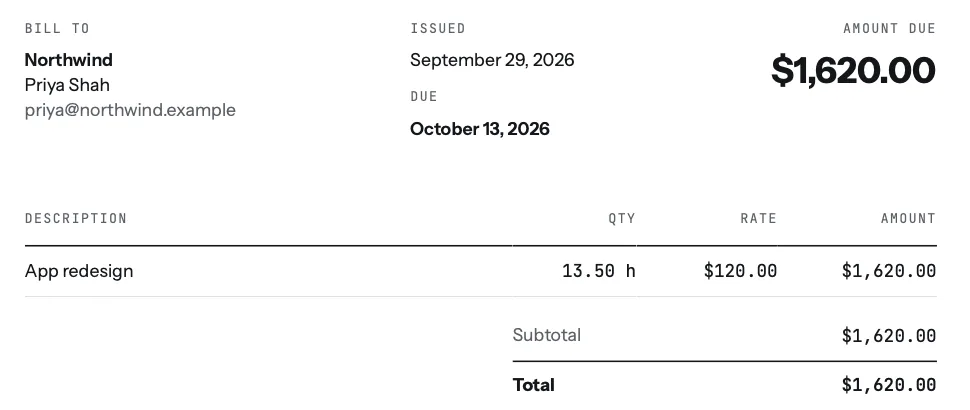
Not ready for an app? The free invoice generator makes a clean PDF in a minute, and timesheet to invoice turns a list of hours into line items. If the due date passes with no payment, the day 3, 10, 21 follow-up schedule has the wording.
6. Set aside tax from the first payment
Nobody withholds tax from a freelance payment. In the US, if your net earnings from self-employment are $400 or more you usually owe self-employment tax, at 15.3% (12.4% for Social Security and 2.9% for Medicare), generally on 92.35% of those net earnings, on top of income tax (IRS Topic 554). If you expect to owe $1,000 or more when you file, you generally need to pay estimated tax during the year (IRS, Estimated taxes). For tax year 2026 the last quarterly payment is due January 15, 2027 (IRS estimated tax FAQ).
Checked October 26, 2026. General information, not tax advice; a tax professional can tell you what applies to you.
The simplest habit: when a payment lands, move a share of it into a separate savings account before you spend anything. The freelance tax calculator estimates how much. tab's Money screen shows a tax set-aside for what you collected this month and this year, starting at 25%, a percentage you can change right there.
The one-hour checklist
- Written agreement: work, price, revisions, payment terms, ownership.
- Rate checked against your real costs.
- Invoice schedule and due date chosen, payment method agreed.
- W-9 ready if a US client asks.
- Clock running before the kickoff call.
- A separate account for tax money.
Then do the work. The first client is the hardest one to land; the setup makes sure it is worth it.
Keep reading
 Start here57 free notes, sorted by what you need this week: first client, pricing, late payments, taxes.
 Open enrollment, self-employedThe 2027 dates, estimating an uneven income, and pricing health insurance into your rate.
 Side hustle to full-timeFour numbers to check before you quit: real rate, monthly costs, runway, and client risk.
Questions
What do I need before starting work with my first freelance client?
A written agreement (the work, the price, revisions, payment terms and who owns the work), a rate that covers your real costs, a way to track your hours from the first minute, an invoice with a due date, and a plan to set aside tax from each payment.
Do I need a contract for a small freelance job?
It's wise to have the terms in writing for any job, even as an email the client agrees to. In New York City, contracts worth $800 or more (including smaller jobs adding up to $800 within 120 days) must be in writing by law.
How much should I set aside for taxes as a new freelancer?
It depends on your income and where you live. US self-employment tax alone is 15.3% on most of your net earnings, before income tax. A freelance tax calculator gives an estimate; a tax professional can give you a real answer.
Can I track time and invoice my first client without signing up?
Yes. tab's trial runs with no account: track the job and download the invoice as a PDF. It lasts 7 days in that browser; add your email to keep it, email invoices, or take payments online.
First client? Start the clock.
tab tracks the hours and turns them into the invoice. Free to start, and you can try it right now without an account.
Start free Try it, no sign-upFree to startNo cardNo screenshots, ever