Notes · time tracking
Closing time: the 15-minute Friday close
Six steps, same order every week, so no hours, invoices or payments slip into the weekend.
Updated 2026-10-27
A shop doesn't just switch off the lights at closing time. Someone counts the till, locks the door and leaves a note for the morning. Most freelancers skip that part. Friday afternoon fades into the weekend, and on Monday the week before is already a blur: hours half remembered, an invoice not sent, a payment nobody noticed.
A Friday close fixes that in about fifteen minutes. Same steps, same order, every week. It is small enough to actually do, and it catches the things that cost money when they slip: forgotten hours, late invoices, unpaid ones, and the tax share of what came in.
The Friday close, step by step
Set a recurring 15-minute slot on your calendar, late Friday afternoon or whenever your week ends. Then work through these six steps. The times are a guide, not a stopwatch.
1. Check the week's hours (3 minutes)
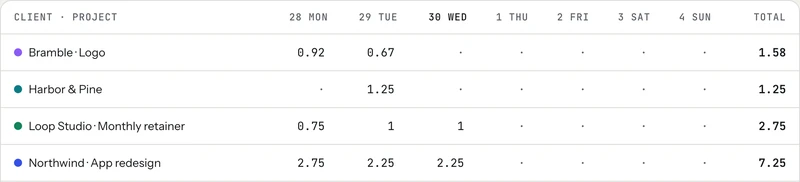
Open your week and look at each day's total. A day that looks too short usually means a call, a burst of emails or an afternoon you never started the clock for. Add what's missing with an honest estimate and a short note. Also look for the opposite: a timer that ran through lunch or overnight.
In tab, the weekly timesheet shows every client and project by day, and you can type straight into a cell to fix it. The Today screen lists the untracked stretches inside your working hours, each with a Fill it button.
For where hours usually hide and how to find them, see finding unbilled hours.
2. Send each client their week (3 minutes)
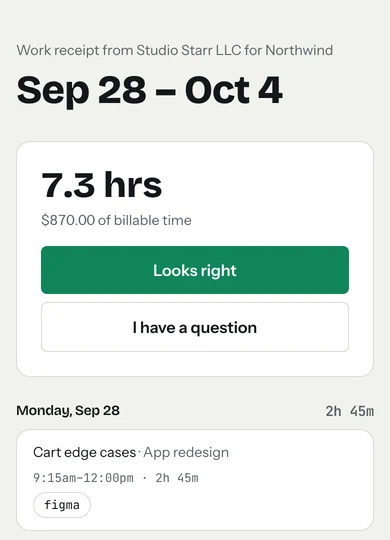
Send active clients a short summary of what you did, with links to the work, and one line on what's next. Sending it on Friday means they read it Monday morning, and any question about the hours comes up now instead of on the invoice.
In tab, that's the weekly work receipt: press Send on the week, add a line if you like, and the client can answer "Looks right" or "I have a question" in one tap. Weekly client updates covers what to put in it.
3. Send the invoices that are due (3 minutes)
Whatever your rhythm is (weekly, every two weeks, at the end of a project or a milestone), check whether anything is due and send it now. An invoice sent on Friday is in the client's inbox when their week starts. An invoice you meant to send "next week" is how a month goes unbilled.
In tab, Close the tab turns a client's unbilled hours into a draft invoice you check before it goes out. Without tab, timesheet to invoice turns hours into line items, and the invoice generator makes the invoice.
4. Look at what's still open (2 minutes)
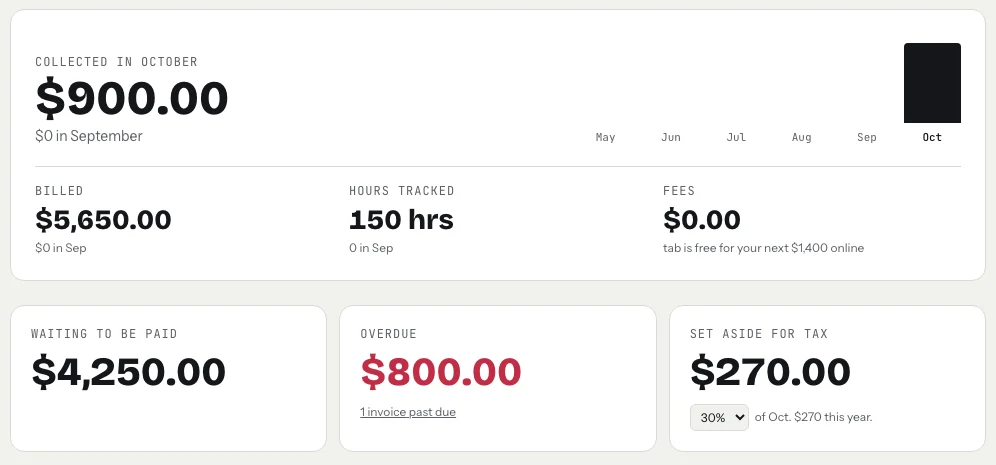
Three questions. Did anything get paid this week? Is anything past due? Did a check or bank transfer arrive that you haven't recorded? Record what came in, and for anything past due, send a polite reminder or check that one is already on its way. Following up on an unpaid invoice has a schedule and wording.
tab's Money page shows what's waiting to be paid, what's overdue and how many invoices that is, and you can record a payment you received outside tab with its date and how it was paid. If you've switched on overdue reminders for a client, tab sends them at 3, 10 and 21 days past due, so this step is mostly a glance.
5. Move the tax share (2 minutes)
Whatever arrived this week, move a share into a separate savings account now, while you know the number. Waiting until the quarterly payment means finding a large amount at once.
In the US, if you expect to owe tax on self-employment income, estimated payments are generally due April 15, June 15 and September 15 for the first three periods of the year, and January 15 of the following year for September through December. When a date falls on a weekend or legal holiday, it moves to the next business day (IRS: Estimated tax FAQ). The freelance tax calculator helps you pick a percentage.
Checked October 26, 2026. General information, not tax advice.
6. Leave a note for Monday (2 minutes)
Write down the first thing you'll do on Monday, for each active client if you have more than one. One line each. Monday starts with a decision already made, and the weekend doesn't fill up with "what was I doing again?".
The checklist to copy
Paste it into your calendar event so it's in front of you every week.
Making it stick
- Same time every week. A fixed slot works better than "sometime Friday". If Friday is a client day, close on Thursday evening instead. What matters is the rhythm.
- Don't do work inside the close. If a step turns up a real task, like a long reply to a client, write it down for Monday. The close stays short.
- Track as you go. The close is quick only when the week is mostly tracked already. One timer per client helps, and the meter on the homepage runs without an account if you want to try it.
- Go deeper once a month and once a quarter. The Friday close keeps the week clean. Month-end invoicing and the quarterly look back pick up the bigger questions, like which clients really pay well per hour.
Keep reading
 Finding unbilled hoursThe gaps, quick calls and forgotten timers, and a ten-minute Friday check to catch them.
 Track time by projectOne client, several jobs: split every hour onto the right project, and bill each one right.
 Freelance working hoursSet your hours, share them once, protect focus time, and see where the week really goes.
Questions
What is a Friday close for freelancers?
A short end-of-week routine, about 15 minutes, done the same way every week: check the week's hours, send each client a summary, send invoices that are due, record payments and follow up on late ones, set aside tax, and write down Monday's first task.
Why do the weekly review on Friday?
The week is still fresh, so forgotten hours are easy to remember, and anything you send to clients is waiting for them when their week starts on Monday. Any day works if it's the same every week.
How much should I set aside for taxes each week?
It depends on your income, location and deductions. Move a fixed percentage of whatever arrived into a separate account each week, and use a tax calculator or a tax professional to choose the percentage. US estimated payments are due four times a year.
Can tab help with a weekly close?
Yes. The weekly timesheet and Today's gap list help you check the hours, work receipts send each client their week, Close the tab builds the invoice, and the Money page shows what's waiting, overdue and set aside for tax.
Close the week in fifteen minutes.
tab keeps the hours, sends each client their week, builds the invoice and shows what's still owed. Free to start, no account to try it.
Start free Try it, no sign-upFree to startNo cardNo screenshots, ever