Notes · time tracking
Carve out your working hours, and keep the shape
Set your hours, tell clients once, protect your focus time, and track where the week really goes.
Updated 2026-10-27
The best part of freelancing is that nobody sets your hours. The hardest part is the same thing. With no office to leave, work spreads into every gap: a client message at 9pm, a quick fix on Sunday, a morning lost to email. Working hours don't appear on their own. You have to carve them out, and then keep the shape.
Here is a practical way to set your hours, tell clients about them, protect the time you need for deep work, and check where the hours actually go.
Your hours are yours to set
As an independent contractor, a client is generally paying for a result, not for control over when and how you work. The IRS puts the general rule this way: someone is an independent contractor if the person paying for the work has the right to control or direct only the result, and not what will be done and how it will be done. That is general information, not legal advice, but it is a useful reminder: setting your own schedule is part of what being self-employed means.
So pick hours on purpose. Look at when you do your best focused work, when your clients are usually reachable, and what else your life needs. Then write it down as a simple schedule, for example "Monday to Thursday, 9 to 5, Fridays for admin". It doesn't have to be 9 to 5, and it doesn't have to be five days. It has to be specific enough that you can tell when you are outside it.
Checked October 26, 2026. Source: IRS, independent contractor defined.
Tell clients, once, in writing
Clients can't respect hours they don't know about. Put them in your proposal or contract, in your email signature, and in your first message on a new project. Pair them with a response time, which matters to clients more than your exact hours do:
The last one is where boundaries are actually kept. If you answer at 9pm once, the client learns that 9pm works. If you answer at 9am, warmly and with a clear plan, they learn your hours without ever being told off.
Decide in advance what counts as a real emergency, such as a live site down or a launch-day bug, and how a client should reach you for one. If everything is urgent, the word stops meaning anything.
Protect focus time inside your hours
Working hours are not all the same. A day split into 20-minute pieces between messages produces far less than one long stretch. A few habits that help:
- Block your best hours for deep work. Put them in your calendar like a meeting, and don't book calls into them.
- Batch messages. Check email and chat at set times, for example late morning and late afternoon, rather than whenever they arrive.
- Group calls. Offer clients a few fixed call slots on one or two days, so a call doesn't break up every day.
- Mute notifications during focus blocks, on your phone and your computer.
- Keep a short shutdown list. At the end of the day, write down where you stopped and what is first tomorrow. It makes it easier to actually stop.
Track where the hours actually go
Boundaries are easier to keep when you know what your week really looks like. Track your time per client for a couple of weeks, including the small stuff: the quick call, the email that took 40 minutes, the "while you're in there" change. Two things usually show up. Some clients take far more unbilled time than you thought, and some of your working hours went untracked entirely.
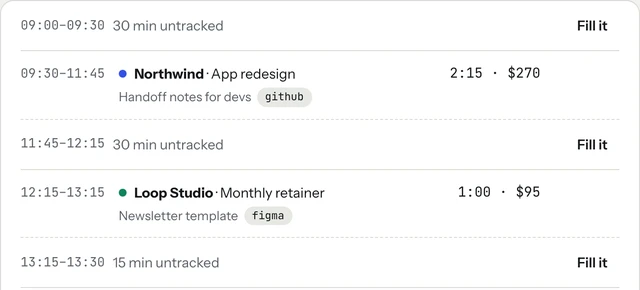
In tab, you set your working hours in Settings: which days, from and to, and your timezone. Inside those hours, the Today screen shows the stretches you didn't track as gaps, each with a Fill it button, so a forgotten hour can still be put on the right client.
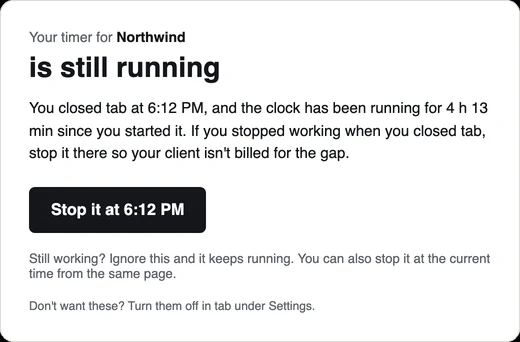
Your working hours also decide when tab speaks up. Its reminders, like "nothing's running, start Northwind?", only appear inside those hours, never more than once an hour for check-ins, and they get quieter each time you ignore them. Outside your hours it stays quiet. And if you close tab with the clock still running, it can email you about 20 minutes later with a button to stop the timer at the time you left, so a client is never billed for your evening.
Then look at the week as a whole. If the tracked total keeps spilling past your planned hours, that is useful information, not a personal failure. It usually means a price is too low or a client is taking more than the job was quoted for. The real rate view shows what each fixed-price project paid per hour, and the hourly rate calculator helps you set a rate that fits the hours you want to work.
When a client keeps crossing the line
Start with the plain version: "Just a reminder that I work Monday to Thursday, 9 to 5, so I'll pick this up first thing tomorrow." Most clients adjust after one reminder. If after-hours requests are a regular part of the job, price them (this note on rush fees has the wording). An agreed out-of-hours rate turns an annoyance into paid work, and clients become more careful about what they call urgent.
If a client still won't work within your hours, that is a fit question, not a scheduling one. It may be time to raise the rate or make room for clients who fit better; past clients who paid well are often the easiest place to start.
A short checklist
- Write down your working days and hours, and a response time.
- Put them in your contract, your signature and your first message on every project.
- Block your focus hours in your calendar and batch messages around them.
- Track every client for two weeks and see where the hours went. The meter on the homepage runs without an account.
Keep reading
 Finding unbilled hoursThe gaps, quick calls and forgotten timers, and a ten-minute Friday check to catch them.
 Track time by projectOne client, several jobs: split every hour onto the right project, and bill each one right.
 The 15-minute Friday closeHours, client updates, invoices, late payments, tax and Monday: six steps every Friday.
Questions
How many hours a day should a freelancer work?
There is no fixed number. Pick hours that match when you do your best work and when clients can reach you, write them down, and track your time for a couple of weeks to see whether the real hours match the plan.
How do I tell clients my working hours?
Once, in writing: in your proposal or contract, your email signature and your first message on a project, together with a response time such as 'replies within one working day'. Then answer late messages the next morning.
Should I answer client messages after hours?
Usually not. Replying at night teaches a client that night works. Agree in advance what counts as a real emergency and how to reach you for one, and consider an out-of-hours rate if after-hours work is a regular part of the job.
Can tab remind me only during my working hours?
Yes. You set your working days, hours and timezone in Settings, and tab's reminders only appear inside them. Untracked time inside those hours shows up on the Today screen as gaps you can fill.
Know where your hours go.
tab tracks your time per client, shows the gaps in your working hours, and stays quiet outside them. Free to start, no account to try it.
Start free Try it, no sign-upFree to startNo cardNo screenshots, ever