Notes · money & taxes
Two keys, two doors: a separate bank account for your freelance work
Why business and personal money should live apart, what the IRS says about it, and a setup you can finish in an afternoon.
Updated 2026-10-27
When the first client pays, the money usually lands in your personal checking account, next to the rent, the groceries and the streaming subscriptions. That works for a month or two. Then tax time arrives, and you are scrolling through a year of statements trying to remember which $49 charge was software for work and which was a birthday present.
A separate account for the business fixes that before it starts. Think of it as two keys on one ring: they look alike, but each opens one door. Here is why it matters, what the IRS says, and how to set it up in an afternoon.
This is general information, not tax, legal or banking advice.
What the IRS says
The IRS's guide for new businesses is direct about it. In Publication 583, under recording business transactions, it says: "One of the first things you should do when you start a business is open a business checking account. You should keep your business account separate from your personal checking account." It adds that the business account should be used for business purposes only (IRS Publication 583, Starting a Business and Keeping Records).
Checked October 26, 2026.
Why it's worth doing, even if you're small
- Your bank statement becomes a business record. Every deposit is income, every charge is a business cost. No sorting, no guessing.
- Tax prep gets faster and cheaper. If you pay someone to do your taxes, clean records mean fewer hours on their bill. If you do them yourself, you can total the year from one statement.
- You see how the business is really doing. When the money is mixed with your personal spending, it's hard to tell whether freelancing is paying your bills. Separate, the balance answers that.
- You stop spending the tax money. Client payments arrive without any tax taken out. When they sit in their own account, it's much easier to set the tax share aside before it looks like spending money.
- Clients see a business. An invoice that asks for payment to "Studio Starr LLC" looks different from one that asks for a personal transfer.
How to set it up
- Decide the name on the account. If you work under your own name as a sole proprietor, the account can often be in your name. If you use a business name or have an LLC, the bank may want paperwork that shows it. Ask the bank what it needs before you go.
- Get an EIN if you need or want one. An employer identification number is the business's tax ID. The IRS says you never have to pay a fee for an EIN, and you can apply online and get one in minutes; beware of websites that charge for it (IRS, get an employer identification number).
- Compare a few accounts. Look at monthly fees and how to avoid them, minimum balances, transfer limits, and whether it connects to the payment tools and accounting app you use. A plain checking account is enough to start.
- Open a second account for tax, at the same bank if possible, so moving money between them takes seconds. Some freelancers also open a third for their emergency fund.
- Point every client payment at the new account. Update the payment details on your invoices, your payment processor's payout account, and any marketplace withdrawals.
- Move your business costs over. Software subscriptions, equipment, a coworking desk. Change the card on each one to the business account's card.
Checked October 26, 2026.
Rules that keep the two keys apart
The account only helps if you use it consistently. Four habits:
- All business money in, all business costs out. Nothing personal on the business card, nothing for work on the personal card.
- Pay yourself with a transfer. Move a set amount to your personal account on a schedule, for example every two weeks. That's your paycheck now.
- Tax first. When a client pays, move the tax share to the tax account the same day. The freelance tax calculator helps you pick a percentage.
- Mistakes happen; write them down. If you pay for something personal from the business account by accident, pay it back with a transfer and add a note to the statement. The IRS also suggests noting the source of deposits and the type of expense (Publication 583).
Checked October 26, 2026.
A simple message to send to the clients you already have, once the account is open:
Some clients may ask you to fill in a new vendor or W-9 form when bank details change. That's normal.
Where tab fits
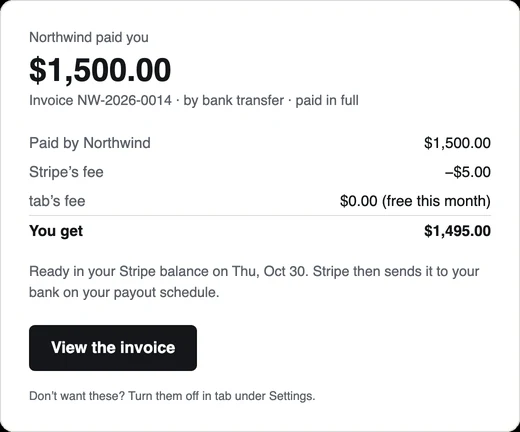
tab never holds your money. When a client pays an invoice online, by bank transfer or card, the payment goes into your own Stripe account, and Stripe pays out to the bank account you connect there. Connect your business account, and every online payment lands on the right side automatically. tab then emails you what came in, Stripe's fee, and what you get:
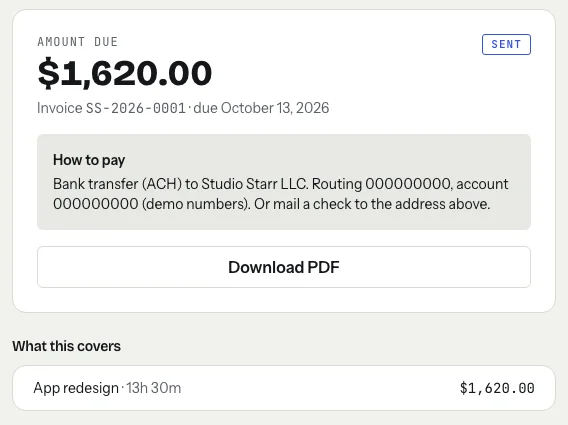
For clients who pay by check or direct transfer instead, you can write your business's payment details once in tab's settings, and they appear on every invoice and pay page, under your business name:
Online payments through tab have no tab fee on the first $2,000 collected each calendar month, then 1% up to $10,000 and 0.5% above that; Stripe's processing fee is separate, and payments you receive outside tab are always free. The payment fee calculator shows what any amount costs by bank or card, and where the money lands compares the options.
Start the clock, no accountSign up free
Pair it with records
A separate account handles the money side. The other half is keeping invoices, time and receipts so each deposit has a story: freelance record keeping covers what to keep and for how long, and a simple invoice numbering system makes every deposit easy to match to the invoice it paid.
Keep reading
 Planning for a slow seasonYour monthly floor, a buffer from the good months, and the past clients to write to first.
 An emergency fund, freelance styleYour monthly floor, a target in months, and a share of every payment until it's full.
 Eight weeks leftA week-by-week year-end plan: bill everything, invoice before the holidays, get taxes ready.
Questions
Do I need a separate bank account as a freelancer?
The IRS recommends it: Publication 583 says to open a business checking account and keep it separate from your personal account. It makes records, taxes and budgeting much simpler.
Can I open a business bank account as a sole proprietor?
Usually yes. Requirements differ by bank, especially if you use a business name, so ask the bank what documents it needs before you apply.
Do I need an EIN to open a business bank account?
It depends on the bank and your business setup, so ask the bank first. An EIN is free from the IRS and you can apply online; never pay a website for one.
How should I pay myself from a business account?
With a regular transfer to your personal account, for example every two weeks, after moving the tax share aside. Keep personal spending off the business account.
Get paid straight into the right account.
Clients pay tab invoices by bank or card into your own Stripe account, paid out to the bank you choose. Free to start, no account to try it.
Start free Try it, no sign-upFree to startNo cardNo screenshots, ever