Notes · pricing
New year, new rate: how to raise your freelance rates
Pick the number from your own data, tell clients in the right order, and send a short letter you can copy.
Updated 2026-10-27
Most freelancers set a rate for their first client and then keep it, year after year, because asking for more feels risky. Meanwhile your skills grow, your costs go up, and the work gets better. A rate that never moves is a pay cut you give yourself every year.
November is the easiest month to fix it. A new rate that starts in January gives clients time to plan, and "new year, new rates" is something they already expect from their other suppliers. Here is how to pick the number, who to tell first, and a letter you can copy.
Step 1: pick the new number from your own data
Start with what the work actually paid you this year, not what you meant to charge. Divide what you billed each client by every hour you spent on them, including calls, emails and revisions. That's your real hourly rate, and it is often lower than the rate on your invoices.
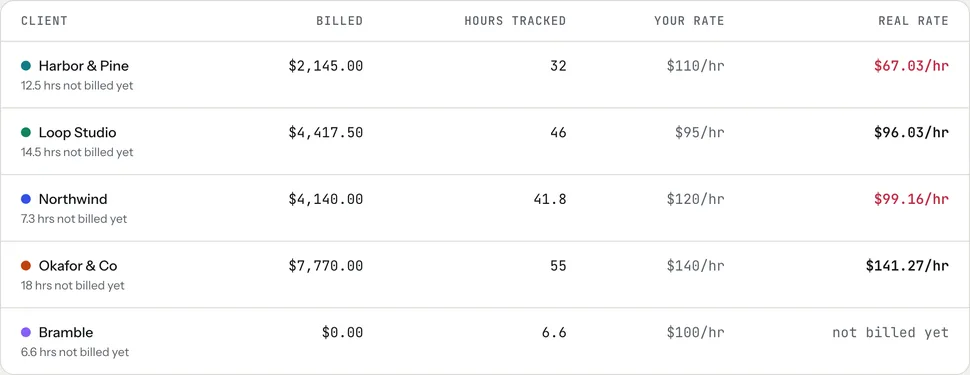
Then check three things:
- Your floor. The lowest rate that covers your income, taxes, costs, time off and unpaid admin. The hourly rate calculator works it out, and what goes into a freelance rate explains each layer.
- The market. Your profession's rate guide shows what employees in the same role earn, which is a useful sanity check.
- Prices in general. The U.S. Consumer Price Index rose 3.7% in the 12 months ending September 2026, before seasonal adjustment (Bureau of Labor Statistics). If your rate stayed flat over that time, it buys less than it did a year ago.
Checked October 26, 2026.
A round number is easier to say and easier to accept. If your real rate with one client came in well under your rate, that client is the strongest case for a change, because the numbers already explain it.
Step 2: decide who gets the new rate, and when
You don't have to raise everyone at once. A simple order:
- New clients first. Every quote you send from today uses the new rate. Nobody has to be told anything; it's just your price.
- Existing hourly clients, with notice. Tell them now that the new rate starts on a set date, such as January 1. About 30 to 60 days' notice is fair and gives them time to adjust a budget.
- Fixed-price and monthly work, at renewal. Change the price when the agreement renews, not in the middle of a term you already agreed.
- Work in progress stays at the old rate. Finish what you quoted at the price you quoted. Changing the deal halfway through costs more trust than it earns.
If you have a long-standing client you want to keep at a lower rate for a while, that's allowed. Make it a decision, write down when it ends, and don't let it become the default.
Step 3: send the letter
Keep it short. State the new rate, the date it starts, and one line about the relationship. You don't need to apologise or explain your costs.
Send it by email so the new rate is in writing, and put the same rate in the next quote or contract. If you work in New York City, freelance contracts of $800 or more must be in writing anyway (NYC Department of Consumer and Worker Protection); the contract basics note covers what to include. This is general information, not legal advice.
Checked October 26, 2026.
When a client pushes back
Some clients will say yes without a reply. Some will ask a question. A few will say no. Each is fine.
- "Can you keep the old rate?" Offer a smaller scope at the new rate rather than the same work for less: "I can't keep the old rate, but we could make it two posts a month instead of three." The negotiation note has more moves like this.
- "Can we start it later?" A short delay, for example to the start of their next quarter, is a reasonable trade if they confirm the date in writing.
- "We can't afford it." Thank them, finish the agreed work well, and leave the door open. Losing a low-paying client frees hours for better-paid work, and past clients who paid well are often the easiest place to find it.
Changing the rate in tab
In tab, each client has its own hourly rate, set on the client. Change it there and new time is priced at the new rate. Hours you already tracked keep the rate they were tracked at, so a January change never rewrites a December invoice.
For fixed prices, give the project a renewal date. tab's Grow screen then lists fixed-price work that paid less than your rate and renews within 30 days, suggests a new price from the hours you tracked, and drafts a short note. tab never emails the client from Grow; you open the note in your own email or copy it, so it comes from you.
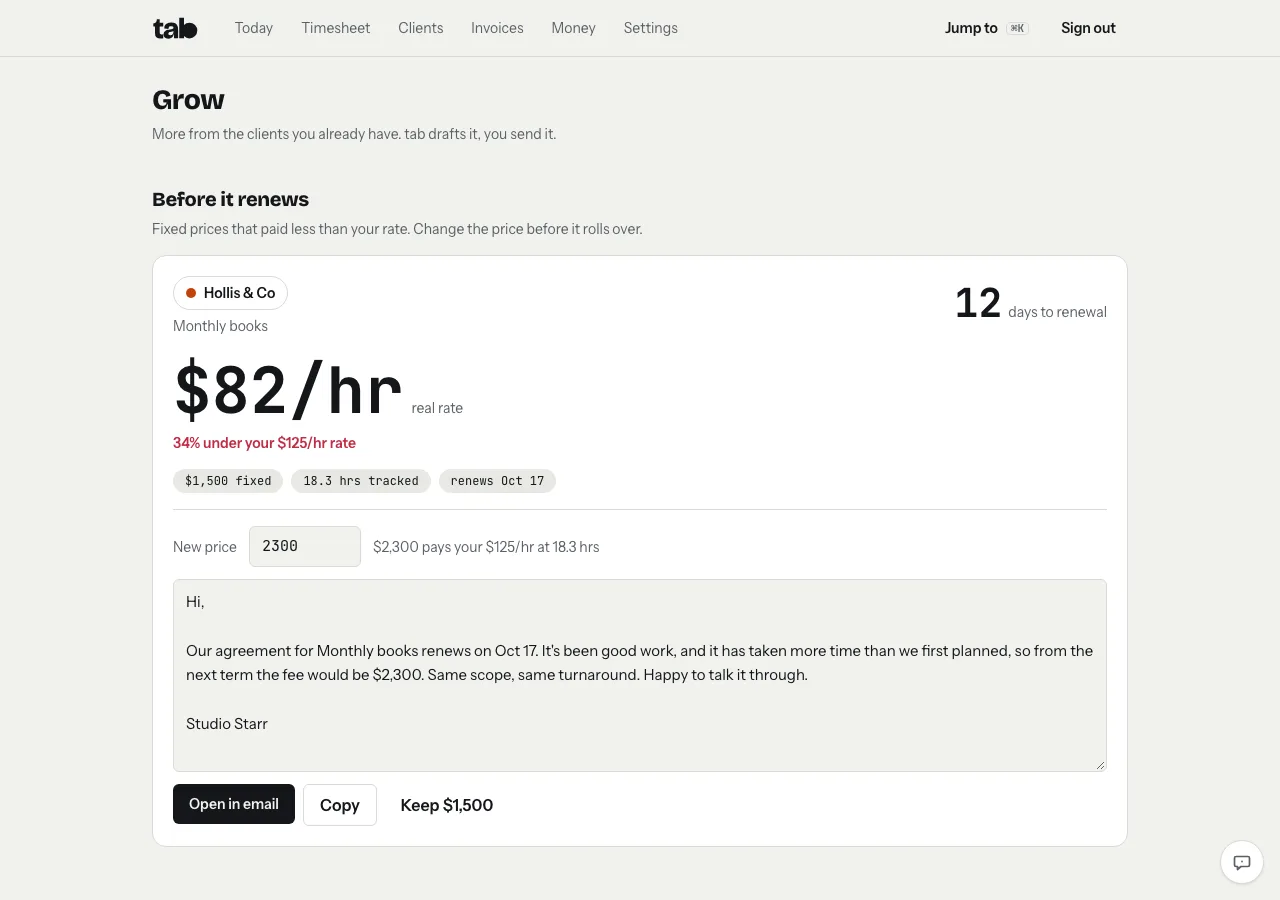
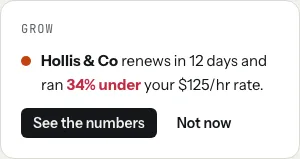
The Today screen also shows a one-line nudge when a renewal like this is coming up, so the date doesn't sneak past.
Not using tab yet? Start the meter on the homepage with your client and new rate, no account needed, and you'll have real hours to back the next rate change.
Keep reading
 Negotiate your rateAnchor first, offer options, and trade scope instead of discounts. With wording you can copy.
 What goes into a freelance rateTax, costs, time off, unbilled hours and profit: the layers on top of your old hourly pay.
 Retainers and depositsGet paid before (or as) you work: deposits, monthly retainers, and the words to use.
Questions
How much should a freelancer raise their rates each year?
There's no fixed rule. Base it on your own numbers: your real hourly rate per client, the floor that covers your costs and taxes, and what similar work pays. As a reference point, U.S. consumer prices rose 3.7% in the 12 months ending September 2026, so a flat rate buys less than a year ago.
How much notice should I give clients before a rate increase?
About 30 to 60 days is fair for ongoing clients. Telling them in November for a January 1 start gives them time to plan next year's budget. Fixed-price work changes at its next renewal, and work already agreed stays at the old rate.
How do I tell a client I'm raising my rate?
By email, in a few lines: the new rate, the date it starts, that work already agreed stays at the current rate, and an offer to talk it through. No apology or long explanation needed.
Does changing a client's rate in tab change past hours?
No. Each finished time entry keeps the rate it was tracked at. The new rate applies to time you track after the change.
Back the new rate with real hours.
tab tracks time per client, shows what each one really paid per hour, and drafts the renewal note when a fixed price ran low. Free to start, no account to try it.
Start free Try it, no sign-upFree to startNo cardNo screenshots, ever