Notes · time tracking
A string round your finger: time tracking habits that stick
Five small cues, a quick way to recover when you forget, and reminders that speak up only when they help.
Updated 2026-10-27
The old trick for remembering something is a string tied round your finger. It doesn't do the remembering for you. It just puts a cue where you can't miss it. Time tracking needs the same thing. Almost nobody forgets to track because they don't care. They forget because the moment to start the clock passes while they are busy doing the work.
This note is about building a few small habits so tracking happens without willpower: a cue for each moment in the day when time usually slips, a way to recover when it does, and settings that remind you only when it helps.
Tie tracking to things you already do
The easiest habits ride on top of an existing one. Instead of "remember to track", pick the moments that already happen every day and attach tracking to each of them:
- When you sit down to work: start the clock before you open email or the client's file. Starting is the first step of the task, not a separate chore.
- When you switch clients: switch the clock in the same motion as switching windows. One action, not "stop, then start, then pick".
- When you stop: write the note before you close anything. "Checkout flow, error states" takes five seconds now and five minutes of guessing on Friday.
- When a call ends: log it before you do anything else. Calls are the hours most often lost, because the timer was never involved.
- At the end of the day: look at the day's total. If it looks short, you'll still remember why.
Five cues, each a few seconds. That's the whole system.
Make starting take one tap
Every extra step between "I'm working" and "the clock is running" is a chance to skip it. Remove the steps:
- One button per client. Picking from a long list every time is friction. A row of buttons for the clients you work with this week isn't.
- Keep the clock where you can see it. A timer hidden in a browser tab you never look at is how clocks get left running, or never started.
- Track first, tidy later. Start the clock with no project or note if that's what it takes. You can add the detail when you stop.
In tab, Today shows a button for each client and project you work on, and tapping one starts the clock on it. Tapping another switches over at the same second. On a computer with Chrome or another Chromium browser, the pop-out meter keeps a small timer floating above your other windows.
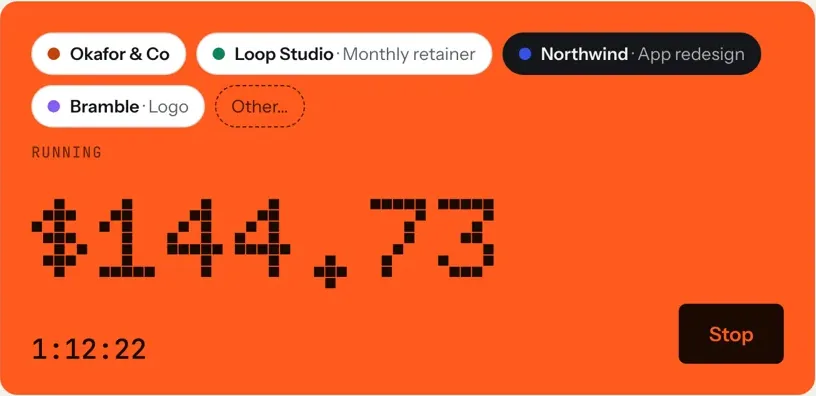
See four clients, one clock for how switching works across several clients, and tracking time by project for splitting a bigger client into jobs.
When you forget anyway: add it in words
You will forget sometimes. The habit that saves you is recovering right away, while you still know what happened, instead of reconstructing it on Friday.
Keep the recovery quick. tab's quick add takes plain language, for example 25m northwind / call about checkout or 2h figma northwind yesterday, and shows exactly what it will save before you save it. The weekly timesheet also takes typed hours straight into a cell.
Let the clock remind you, gently
Reminders help, but only if they're rare and well timed. Too many and you'll switch them all off. A good setup speaks up in three situations only:
- You seem to be working but nothing is running, and only during your working hours.
- A timer has been running much longer than usual, so you can confirm or fix it.
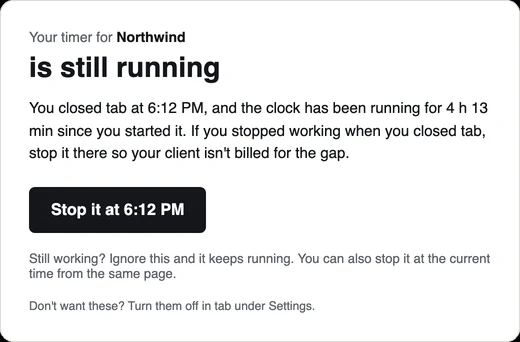
- You closed the app with the clock still running, so the evening doesn't end up on an invoice.
tab has each of these, with its own switch. You set your working hours and work days in Settings, and reminders only speak up inside those hours. Check-ins ("Still on Northwind?") come at most once an hour and get quieter each time you ignore one. If you close tab with the timer running, about 20 minutes later it emails you a button to stop it at the time you left.
Start the clock, no accountSign up free
Make the habit worth it
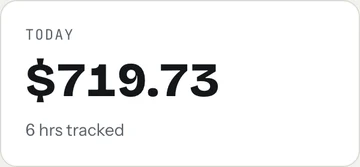
Habits stick when you see the payoff. For hourly work, the payoff is money, so look at it. A running total for the day turns tracking from admin into a small win: each entry is visible, earned money.
The other payoff is fewer arguments. Notes on each entry become the weekly update the client sees and the lines on the invoice, so good tracking habits turn into fewer questions later. Weekly client updates shows how.
A starter routine for the first two weeks
Don't try every habit at once. Add one cue at a time:
- Week one: start the clock before opening any client file, and write a note every time you stop.
- Week two: log every call the moment it ends, and look at the day's total before you finish.
- Every Friday: spend a few minutes catching what slipped. Finding unbilled hours has a checklist.
You can try the clock right now: the meter on the homepage runs in your browser with no account. And once you have a few weeks of honest hours, check what your work really pays per hour, or set your next price with the hourly rate calculator.
Keep reading
 Finding unbilled hoursThe gaps, quick calls and forgotten timers, and a ten-minute Friday check to catch them.
 Track time by projectOne client, several jobs: split every hour onto the right project, and bill each one right.
 Freelance working hoursSet your hours, share them once, protect focus time, and see where the week really goes.
Questions
How do I remember to track my time as a freelancer?
Attach tracking to moments that already happen: start the clock when you sit down to work, switch it when you switch clients, write a note when you stop, log calls as soon as they end, and check the day's total before you finish.
What should I do if I forgot to start my timer?
Add the time as soon as you notice, with a rough length and a few words about the work. A quick entry the same day is far more accurate than rebuilding the week on Friday.
Do time tracking reminders help?
They do when they're rare and well timed: when you seem to be working with nothing running, when a timer runs much longer than usual, and when you close the app with the clock still going. Too many reminders get switched off.
Can tab remind me to start or stop the timer?
Yes. tab can nudge you when it looks like you forgot to start (only inside your working hours), check in when a timer runs much longer than usual, and email you if you close tab with the clock running. Each has its own switch.
Tracking that remembers for you.
One tap per client, plain-words quick add, and gentle reminders inside your working hours. Free to start, no account to try it.
Start free Try it, no sign-upFree to startNo cardNo screenshots, ever