Notes · clients
Juggling several clients without dropping one
One list, a week planned by deadline, a clock per client, and an invoicing rhythm for each. The systems that keep every act running.
Updated 2026-10-27
One client is a job. Three or four at once is a show under a big top: several acts running at the same time, each one convinced it is the main event. The work itself is usually fine. What slips is the stuff around it: the reply you meant to send, the hour you forgot to log, the invoice that went out two weeks late because another client's deadline ate the week.
Juggling clients well comes down to a few simple systems. None of them take long. They just have to run every week, whichever client is loudest.
Keep one list of every client and where they stand
Start with a single place that shows all your clients at once. A notebook page or a spreadsheet works. For each client, keep four things current:
- What's in progress and the next deadline.
- Who is waiting on whom. Are they waiting for your draft, or are you waiting for their feedback?
- Hours or money not billed yet. So nothing sits unbilled for months.
- When you last spoke. The quiet client is the one you're most likely to drop.
Look at the list at the start of each week before you open your inbox. The inbox shows you who is loudest; the list shows you who needs you.
Plan the week by deadline, not by noise
Each Monday, give every active client a slice of the week on purpose. Start with hard deadlines, then work that unblocks someone else (a client waiting on you is a client whose project has stopped), then everything else.
Some freelancers give each client fixed days, for example one client on Monday and Tuesday mornings, another on Wednesday. It makes the week predictable for you and for them: the client knows when their work happens, and you aren't switching context six times a day. If that is too rigid for your work, at least protect a block for each client somewhere in the week.
When two deadlines collide, tell the client who has more room as early as you can, with a new date: "The draft will be with you Thursday instead of Tuesday. Monday's review call still works." An early heads-up with a real date is a minor change. A missed deadline with no warning is how clients get dropped.
One clock per client
With several clients, the most common billing mistake is time landing on the wrong one, or nowhere. You finish a call for one client, jump straight into another's file, and an hour later can't say where it went.
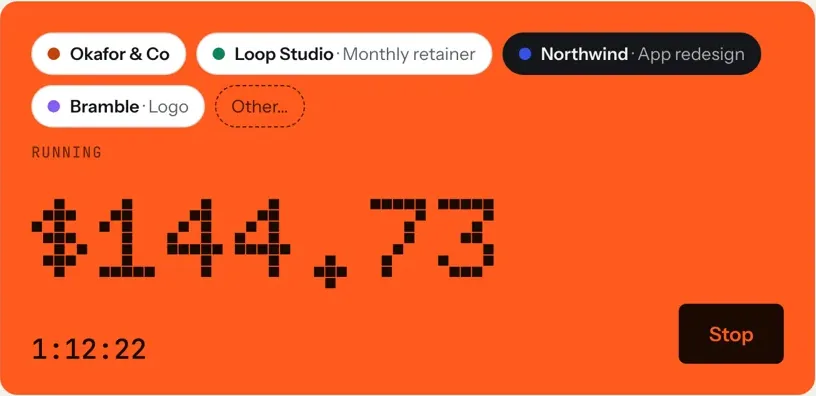
The fix is to make switching clients the same action as switching the clock. In tab, each client has their own button above the meter. Tap the next client and the last one stops at the same second, so there's no gap and no overlap, and the meter shows what the current client owes as you go. The four clients, one clock page shows how it works.
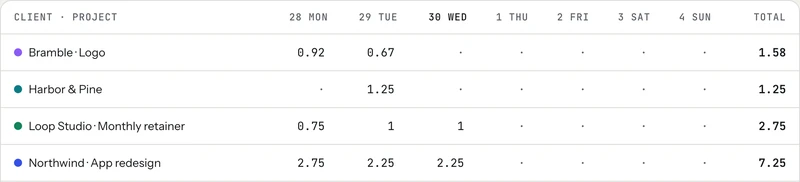
Forgot to switch? You can type a line like "2h figma northwind yesterday" and it lands on the right client. At the end of the week, the timesheet shows every client's hours side by side, which makes it easy to spot a client you didn't touch at all.
Keep each client feeling like the only one
Clients don't need to know how busy you are, but they do need to feel that their project is moving. Two habits do most of the work:
In tab, the weekly update can be a work receipt: a link to that week's hours, notes and work links, which the client approves in one tap. For clients who like to look in more often, a live tab shows what's on their tab as it builds. This note on weekly client updates covers what to put in one.
Give every client an invoicing rhythm
Different clients often need different billing: one wants an invoice on the first of the month, another pays every two weeks, a third has a fixed fee split into parts. Write each client's rhythm down, with their payment terms, and put the invoicing days in your calendar. Invoicing on a fixed rhythm means a busy week for one client never delays getting paid by another.
In tab, each client has their own rate, currency, billing email and payment terms, from "on receipt" to 60 days. When an invoice day comes, Close a tab shows every client with what is unbilled for each, and turns that client's hours into a draft invoice you check before sending. You can then see when it was sent and when the client opened it.

No app yet? The timesheet to invoice tool turns a list of hours into line items, and the invoice generator makes the invoice. If one goes unpaid, here is a follow-up schedule.
Check which clients are worth the juggling
Once a month, look at what each client really paid per hour: what they were billed, divided by every hour you spent on them, billable or not. Some clients quietly take far more time than they pay for. The real rate view in tab shows this per client and per fixed-price project, and it is the clearest guide to which act to raise the price on, and which to let go so the others get your best work.
And when a good client goes quiet, don't wait for them. tab's Grow screen points at clients who paid well and haven't booked in a while, and drafts a short check-in you send yourself.
The weekly routine, in five lines
- Monday: read the client list, then plan the week by deadline.
- Every day: switch the clock when you switch clients.
- Friday: send each active client their update.
- On each client's invoicing day: close their tab and send the invoice.
- Monthly: check the real rate per client.
Try the clock on the homepage meter; it runs without an account.
Keep reading
 Freelance contract basicsThe six things to settle in writing before you start, and where the law requires it.
 Weekly client updatesWhat to send every Friday so the invoice is just the total of things the client already saw.
 Saying no to clientsFour kinds of no (later, smaller, at my rate, not me) and the words for each.
Questions
How many clients should a freelancer have at once?
There is no right number. Enough that losing one doesn't break your income, and few enough that each gets a real slice of your week. Tracking hours per client shows you where your limit is.
How do I keep track of time for multiple clients?
Give each client their own timer and switch it whenever you switch work, so time never lands on the wrong client. In tab, tapping the next client's button stops the last one at the same second.
How do I prioritize work for several clients?
Plan each week by hard deadlines first, then work that unblocks someone waiting on you, then everything else. If two deadlines collide, tell the client with more room early, with a new date.
Can I invoice each client on a different schedule?
Yes. Write down each client's billing rhythm and payment terms and put the invoicing days in your calendar. In tab, each client has their own rate, currency and payment terms.
Every client on their own clock.
Add your clients with their rates and tap the one you're working for. tab keeps the hours apart and turns each into its own invoice. Free to start, no account to try it.
Start free Try it, no sign-upFree to startNo cardNo screenshots, ever