Notes · getting paid
One slip per line: invoice line items clients don't question
What goes on each line, how much detail to give, and wording for time, fixed fees, expenses and discounts.
Updated 2026-10-27
Old shops kept a receipt spike by the till: every slip pushed onto the same nail, one per sale, so anyone could check what happened that day. An invoice does the same job for a freelancer. Each line is a slip. When the slips are clear, the client reads the total and pays. When they are vague, the client starts asking questions, and the payment waits until you answer them.
Most invoice questions are not about your rate. They come from lines the client can't match to anything they remember. Here is how to write line items that hold up: what goes on each line, how much detail to give, and wording you can copy.
What every line needs
A line item has four parts. Get all four right and most questions disappear:
- Description: what the work was, in the client's words. "Checkout flow, empty and error states" beats "Design work".
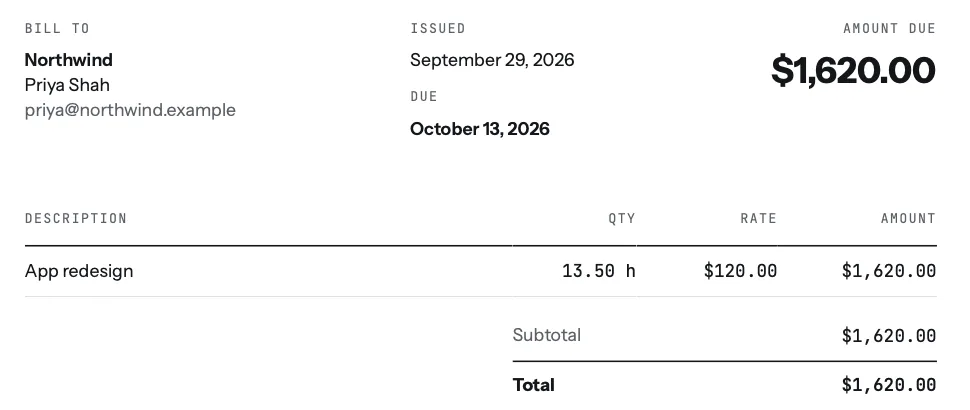
- Quantity: hours for time, or 1 for a fixed item. Show hours the same way on every invoice, for example 13.50 h or 13h 30m.
- Rate: the price per hour or per item. If two rates apply (say, design and a rush rate), use two lines.
- Amount: quantity times rate. The client should be able to check it with a calculator.
How much detail? Match it to the client
There is no single right level. Pick the one that matches how the client thinks about the work:
- By project. One line per project: "App redesign, 13.50 h". Good for clients who saw the work as it happened and only need the total.
- By day. One line per day and project: "Tue, Oct 6 · App redesign". Good for clients who compare your invoice with their calendar or their own notes.
- Every entry. One line per piece of work with its note: "Tue, Oct 6 · App redesign · handoff notes for devs". Good for new clients, agencies billing their own client, and anyone who has questioned an invoice before.
If you aren't sure, start with more detail for a new client. You can always simplify once they trust the numbers. Going the other way, after a question, feels defensive.
tab offers exactly these three choices when you build an invoice: group hours By project, By day or Every entry. Hours with no project are named by the day and your notes ("Sat, Oct 24 · homepage revisions"), never something like "General". Every description stays editable before you send.
Wording that heads off questions
Write each description as an answer to "what did I pay for?". A few patterns that work:
Two more habits help. Put changes the client asked for on their own line ("Extra round of revisions, requested Oct 14"), so extra work is visible rather than buried in a bigger number. And keep the language the same from invoice to invoice, so a regular client can compare months at a glance. For the conversation about extras, see when one small change becomes ten.
Lines tab can add for you
When you close a client's tab, the unbilled hours become time lines. Below them you can add three other kinds of line with Add a line: an Item (a fixed fee or deliverable), an Expense, or a Discount. If a project has a fixed price split into parts, tab offers the next open part as a line you can tick, labelled with which part it is.
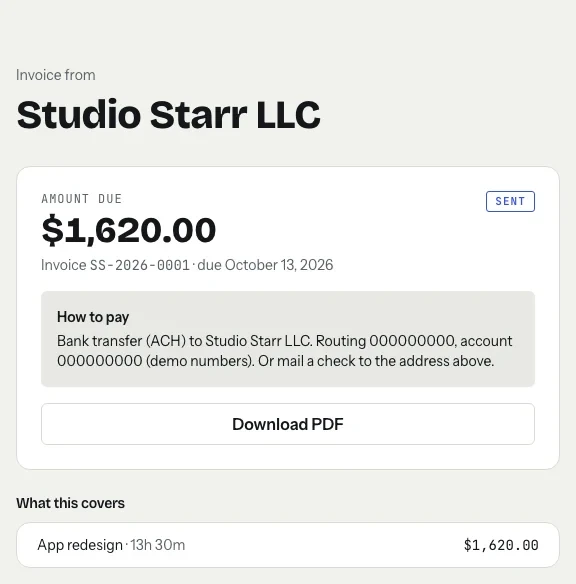
If the client approved the week on a work receipt, those hours are marked approved on the invoice, and the PDF notes that they were "Approved by client on the weekly work receipt". The client's invoice page lists every line under "What this covers", with the time on each hourly line.
Start the clock, no accountSign up free
Back every line with a record
A line is only as strong as what's behind it. For time, that's the dated entries with a note on each. For expenses, it's the receipt. If a client asks, you should be able to show the entries behind any line in a minute.
The records matter for taxes too. The IRS lists invoices among the documents that support both your gross receipts and your expenses (IRS: What kind of records should I keep). Clear line items make your own bookkeeping easier when you look back at the year.
Checked October 26, 2026. General information, not tax advice.
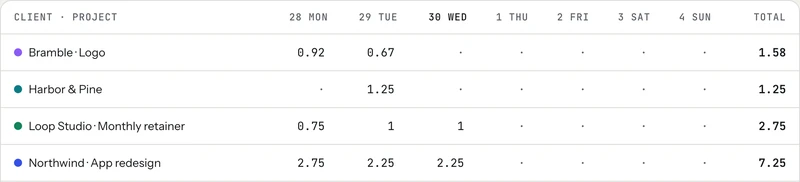
In tab, each entry keeps its note and work links, the weekly timesheet shows the hours by client and day, and everything exports as CSV. Freelance record keeping covers what to keep and for how long.
A quick check before you send
- Could the client say what each line was without asking you?
- Does each amount equal quantity times rate?
- Are extras and discounts on their own lines?
- Is the detail level right for this client?
- Is there a due date and an easy way to pay?
Not using tab? Timesheet to invoice turns a list of hours into line items, and the free invoice generator builds the invoice. Then how to email an invoice covers the message that goes with it.
Keep reading



Questions
What should an invoice line item include?
A clear description of the work in the client's words, the quantity (hours or 1 for a fixed item), the rate, and the amount. The client should be able to check each amount with a calculator.
How detailed should freelance invoice line items be?
Match it to the client. One line per project works for clients who already saw the work; one line per day or per entry suits new clients, agencies and anyone who has questioned an invoice before.
Should I list discounts and extra work separately?
Yes. A discount on its own line keeps your normal rate visible, and extra work the client asked for on its own line shows what changed instead of hiding it in a bigger number.
Can tab group invoice lines by day or by entry?
Yes. When you build an invoice in tab you can group hours by project, by day, or list every entry with its note, and edit any description before you send.
Invoices built from the work itself.
tab turns your tracked hours into clear line items, by project, by day or by entry, that your client can pay online. Free to start, no account to try it.
Start free Try it, no sign-upFree to startNo cardNo screenshots, ever